Every change, even a change for the better,
always inconvenienced
Richard Hooker
As you may know, Vaadin is one of the most popular Java web frameworks:
More recently, a new release of this framework for developing web UI - Vaadin 10 has been released. There are quite a few publications in Russian about Vaadin 10 and Vaadin Flow, and this post is designed to fill this gap.
The creators are positioning Vaadin Flow as a new Java web framework for developing modern web applications and web sites (I don’t really believe them). This is part of the Vaadin Platform, which comes to replace another product - the Vaadin Framework; it allows you to develop web applications (or, to be precise, web UI) using the Java Web Components standard.
Here, the reader probably has everything in his head mixed up, all these Vaadin Bla Bla, framework, platform and so on. What's happening?
We have been using Vaadin as part of our
CUBA platform for UI back-office systems for over 7 years and have accumulated a lot of experience with it during this time, so we can't help but worry about its fate. Under the cut you will find my specs on Vaadin 10.
Vaadin Framework
Vaadin is a Finnish company that develops tools and libraries for developing UI. They make the same framework for web development in Java.
The Vaadin Framework is a UI framework with a server-side programming model in which all the UI logic and its state are located on the server, and only the UI code of the components is executed in the browser. In fact, this is a thin client technology, where the browser just displays what the server says, and all events are sent to the server.
Server-side approach allows you to forget about the fact that development is carried out under the web, and develop the UI as a Java desktop application with direct access to data and services on the server. In doing so, Vaadin will take care of displaying the UI in the browser and the AJAX interaction between the browser and the server. The Vaadin engine renders the user interface of the server side application in a browser and implements all the details of the client and server exchange.

This approach has many advantages:
- Java code is easier to write and debug
- You can use existing Java libraries and tools (IDE, compilers, testing)
- No need to develop web services
- Security is better
And cons:
- It takes a lot of server memory for UI views
- More difficult to scale solution
- When developing widgets you need to develop Java API
Based on these minuses and advantages, Vaadin FW settled tightly in the enterprise development, where the loads are predictable, and the speed and ease of development is much more important than the cost of iron and memory.
What happened to google web toolkit
All the time that Vaadin is familiar to the general public, the client part of the Vaadin FW was inextricably linked with another well-known product - Google Web Toolkit (GWT). This tandem allowed us to write the UI components themselves and the server API for them in the same language - Java, which was quite convenient.
In recent years, Google Web Toolkit has not evolved, and we’ve been looking forward to the emergence of GWT 3.0 / J2CL, announced at GWT.Create 2015 from 2015:
During this stagnation period (2015-2017), an important event happened: the specification of Web Components and another Google framework, Polymer, appeared. Apparently, this was the beginning of the end of the GWT.
It is worth noting that GWT 3 is developed as an internal Google framework and is developed within the company. So, the community can not influence the process or at least see that the process is underway.
Against this stagnation, the Vaadin team made the difficult decision to completely abandon the development on GWT and
rewrite the client part of its framework . These changes could not go unnoticed and frightened everyone who is already developing on Vaadin.
Web Components
Web Components is a set of standards. He was offered and actively promoted by the guys from Google, but the initiative was already supported by Mozilla. In essence, these are technologies for creating UI components for the web, so that they support encapsulation of behavior and presentation. And the main advantage is reusability.
Basic concepts:
- Custom Elements - API for creating your own HTML elements.
- Shadow DOM is a tool for encapsulating HTML components and isolating their visual presentation from global CSS rules. In short, you can make a component, for example, an order form, and not be afraid that its styles will break down on some of the pages of the site due to the CSS rules of this page.
- HTML Templates - the possibility of placing in the HTML document passive blocks containing DOM elements-blanks. Such blocks are parsed by the browser, but they are not drawn and do not execute their code. They are proposed to use as templates for rendering data.
- HTML Imports - the ability to import an HTML document as a module with all its layout, styles and JS
For example, if you now look at the YouTube DOM tree, you will find out how to use Custom Elements and Shadow DOM:

All these things and allow you to write new trendy UI components for the web.
It is worth admitting that browser support is far from perfect and
polyfiles are still
required , for example, for Edge.
Polymer
Polymer is a small library on top of the Web Components standards, designed to simplify their use. Example:
In fact, Polymer does everything that GWT did before, but it is also compatible with any JS components and other frameworks, for example, React and Angular.
Vaadin Components
Let's go back to Vaadin. Quite a long time ago, Vaadin has been making a product called
Vaadin Components - UI components for front-end developers that can be embedded in any JS applications.
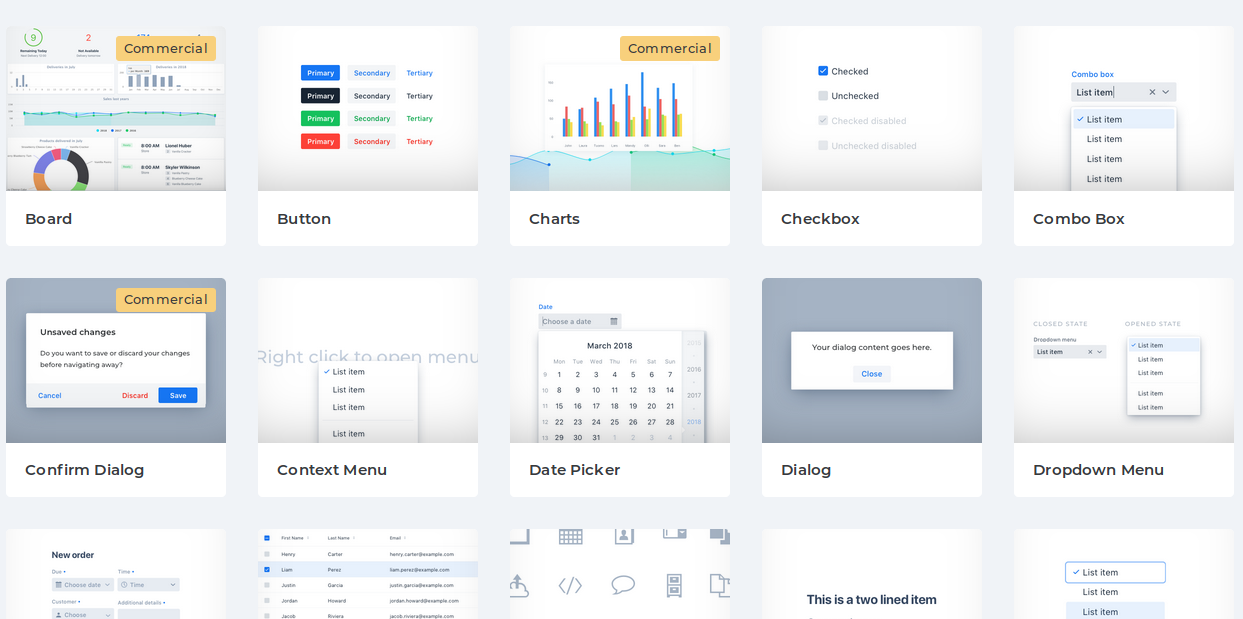
These components are based on Web Components and Polymer!
As we now see, it was a spare airfield for the Vaadin Framework, which allowed us to leave Google Web Toolkit and develop a new framework for which there were no components yet. The problem of chicken and eggs has been solved and Vaadin Components have become the front-end of the upcoming Vaadin 10.
Vaadin flow
Vaadin 8 included a UI state synchronization mechanism and support for a two-way RPC protocol (remote procedure call). This was possible thanks to GWT, since the common interfaces and classes of the server and client were written in Java.
Along with the rejection of GWT, it was necessary to implement a new mechanism that would allow seamless integration with JS frontend and Java backend. This mechanism was Vaadin Flow (and this name was also used to denote the entire Vaadin 10 for a long time).
The Flow
documentation has the following scheme:

Its main meaning is as follows:
- synchronization of the UI state from server to client is supported
- the server part can subscribe to UI component events, and an AJAX request will be executed.
- business logic runs on the server, only data that is displayed in the UI is loaded into the web browser
- server side is using java
- client part can use HTML, CSS, JS and Polymer templates
For me, this means that there will be more front-end technologies in Vaadin, and now Java alone is not enough (for Vaadin 8, Java would be enough for you and no HTML / CSS would be required). On the other hand, easy integration of JS code is now possible.
Vaadin Platform
Each component of Vaadin 10 is developed separately and in the best traditions of the JS of the world - tiny modules, as independent as possible from each other. In this case, the client part of the components is packaged in JAR in the format of WebJARs:
www.webjars.orgThis is a bit scary, especially if you look at the dependency of the minimal project:

In order to somehow manage this chaos, a BOM project (Bill of Materials) called
Vaadin Platform appeared .
This is not a standalone product, but only a list of compatible versions of components and tools designed in the
Maven BOM format.
It connects to Maven
as follows :
<dependencyManagement> <dependencies> <dependency> <groupId>com.vaadin</groupId> <artifactId>vaadin-bom</artifactId> <version>${vaadin.platform.version}</version> <type>pom</type> <scope>import</scope> </dependency> </dependencies> </dependencyManagement>
Vaadin 10 features
Total, the whole framework consists of 3 components:
- Vaadin Components - frontend
- Vaadin Flow - transport
- Server Components API - Java API for UI components
It is worth starting its development from an
official tutorial .
Also, I recommend a
fresh webinar .
Starters
You can get to know the framework more closely from the
page . There you will find examples of projects, including the full-stack based on Spring Boot.
Ardent fans of Spring Boot can proceed right to
start.spring.io and select Vaadin among web frameworks.
You can start a minimal project with a single Java class, for example:
In general, you can write on Vaadin 10, as on Vaadin 8, BUT! It is necessary to look
at the component matching page .
Element API
Killer feature Vaadin 10 - control elements of DOM directly from the server Java code.
Element nameField = ElementFactory.createInput(); nameField.setAttribute("id", "nameField"); nameField.setAttribute("placeholder", "John Doe"); nameField.setAttribute("autofocus", "");
You can also manage the attributes that are already affixed:
Of course, this is not a replacement for UI components, but a good API for simple layout changes when developing UI components is not required.
Data binding
To work with components that implement the HasValue interface (get / set value and ValueChangeListener) there is a convenient binder class:
Binder<Person> binder = new Binder<>(); TextField titleField = new TextField(); binder.forField(titleField) .bind( Person::getTitle, Person::setTitle);
As you can see from the example, statically typed binding based on lambda expressions is supported.
In addition, the binding can install value converters and validators:
binder.forField(yearOfBirthField)
Templates
HTML templates are a layout of the form:
<link rel="import" href="../bower_components/polymer/polymer-element.html"> <link rel="import" href="../bower_components/paper-input/paper-input.html"> <dom-module id="hello-world"> <template> <div> <paper-input id="inputId" value="{{userInput}}"></paper-input> <button id="helloButton" on-click="sayHello">Say hello</button> <div id="greeting">[[greeting]]</div> </div> </template> <script> class HelloWorld extends Polymer.Element { static get is() { return 'hello-world' } } customElements.define(HelloWorld.is, HelloWorld); </script> </dom-module>
The templates support declarative data binding and you can write native JavaScript, which will be executed in the as-is browser. This allows you to implement part of the simplest UI logic without sending requests to the server.
Events
Handling component events
is very simple :
TextField textField = new TextField(); textField.addChangeListener(e -> System.out.println("Event fired"));
Here you will not notice the difference with Vaadin 8.
Routing
Navigation and routing in the application
have become what they should be :
@Route("some/path") public class SomePathComponent extends Div { public SomePathComponent() { setText("Hello @Route!"); } }
Views can determine which URL they process, what parameters they need from the address, and more.
Component Development
For Vaadin 10, you can develop components in the following ways:
Such a straightforward approach to developing custom components is perhaps the biggest step forward. You no longer need to write wrappers for JS on GWT, then to write the server part on Vaadin.
Lumo theme
Instead of SASS,
CSS variables are now used for visual themes, i.e. CSS is no longer required to compile when building a project:
<custom-style> <style> html { --lumo-font-family: "Open Sans", sans-serif; } </style> </custom-style>
And the new
customizable Lumo theme comes to replace Valo.

Migrating from Vaadin FW 8
Migration options with Vaadin 8 are described in the document:
vaadin.com/docs/v10/flow/migration/1-migrating-v8-v10.htmlHere I have bad news for you: if you wrote a huge project on Vaadin 8, then you will need to rewrite it completely when you switch to Vaadin 10. There is no migration path, not a word!
Vaadin 10 and Vaadin 8 are similar in several aspects:
- Server-side approach
- Java to develop UI logic
- The Same Approach to Data Binding
The bottom line:
Vaadin 10 is a new framework written from scratch .
As the developers promise,
Vaadin 8 will be supported until 2022 , perhaps there will be approaches to migration.
Conclusion
I consider it important that the new Vaadin website was written on Vaadin Flow, which becomes the de facto standard for frontend technologies, as the programming language maturity was determined by the fact that its compiler was written in the same language.
I hope that now you can form your opinion about Vaadin 10. In general, this is a good framework and a huge reserve for the future. For me, this is a great experimental ground for new ideas and approaches to building a UI.