This article will not cover the basics of hibernate (how to define an entity or write criteria criteria). Here I will try to talk about more interesting points, really useful in work. Information about which I have not met in one place.

Immediately make a reservation. All the following is true for Hibernate 5.2. Errors are also possible due to the fact that I misunderstood something. If you find - write.
Problems of mapping an object model to a relational
But let's start with the basics of ORM. ORM - object-relational mapping - respectively, we have a relational and object models. And when mapping one to another, there are problems that we need to solve on our own. Let's take them apart.
To illustrate, take the following example: we have the essence of “User”, which can be either a Jedi or an attack aircraft. The Jedi must have strength, and the attack aircraft must have specialization. Below is a class diagram.
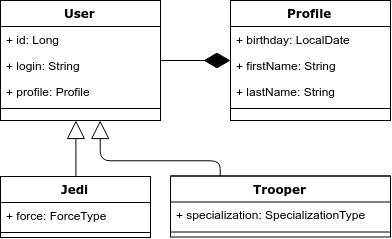
Problem 1. Inheritance and polymorphic queries.
There is inheritance in the object model, but not in the relational one. Accordingly, this is the first problem - how to correctly display inheritance in the relational model.
Hibernate offers 3 options for displaying such an object model:
- All the heirs are in the same table:
@Inheritance (strategy = InheritanceType.SINGLE_TABLE)
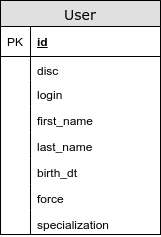
In this case, the common fields and the fields of the heirs are in the same table. Using this strategy, we avoid join-s when choosing entities. Of the minuses, it is worth noting that, firstly, in the relational model we cannot set the “NOT NULL” restriction for the column “force” and secondly, we lose the third normal form. (a transitive dependence of non-key attributes appears: force and disc).
By the way, including for this reason, there are 2 ways to specify the not null field limit — NotNull is responsible for validation; @Column (nullable = true) - is responsible for not null restriction in the database.
In my opinion, this is the best way to display an object model in relational.
- The entity-specific fields are in a separate table.
@Inheritance (strategy = InheritanceType.JOINED)
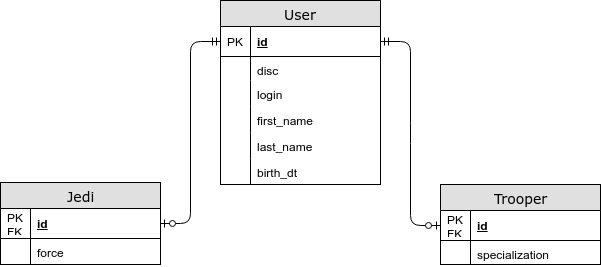
In this case, the common fields are stored in the common table, and specific for the child entities - in separate ones. Using this strategy, we have a JOIN when choosing an entity, but now we save the third normal form, and we can also specify the NOT NULL restriction in the database. - Each entity has its own table
@ InheritanceType.TABLE_PER_CLASS
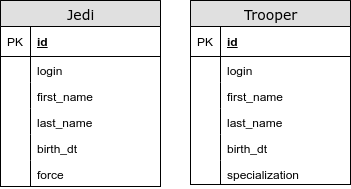
In this case, we do not have a common table. Using this strategy, we use UNION for polymorphic queries. We have problems with primary key generators and other integrity constraints. This type of display of inheritance is strictly not recommended.
Just in case, I will mention the annotation - @MappedSuperclass. It is used when you want to “hide” common fields for several entities of the object model. At the same time, the annotated class itself is not considered as a separate entity.
Problem 2. Composition Attitudes in OOP
Returning to our example, we note that in the object model we have taken the user profile into a separate entity, the Profile. But in the relational model, we did not allocate a separate table for it.
OneToOne is often a bad practice, because In the select we have an unjustified JOIN (even if we specify fetchType = LAZY in most cases we will have a JOIN - we will discuss this problem later).
To display the composition in the general table, there are annotations @Embedable and @Embeded. The first is placed above the field, and the second above the class. They are interchangeable.
Entity manager
Each instance of EntityManager (EM) defines a session to interact with the database. Within an instance of EM, there is a first-level cache. Here I will highlight the following significant points:
- Capture the database connection
This is just an interesting point. Hibernate captures Connection not at the time of receiving the EM, but at the time of first accessing the database or opening a transaction (although this problem can be solved ). This is done to reduce the time of a busy connection. While receiving EM-a, the existence of a JTA transaction is checked. - Persisted entities always have id
- Entities describing one line in a database are equivalent by reference.
As mentioned above, in EM there is a first level cache, the objects in it are compared by reference. Accordingly, the question arises - what fields to use to override equals and hashcode? Consider the following options:
- How flush works
Flush - executes the accumulated insert, update and delete in the database. By default, flush is executed in the following cases:
- Before executing a query (with the exception of em.get), this is necessary to comply with the ACID principle. For example: we changed the date of birth of a storm trooper, and then we wanted to get the number of adult stormtroopers.
If we are talking about CriteriaQuery or JPQL, then flush will be executed if the query affects the table whose entities are in the first level cache. - When committing a transaction;
- Sometimes, when a new entity persists, in the case when we can get its id only through insert.
And now a little test. How many UPDATE operations will be performed in this case?
val spaceCraft = em.find(SpaceCraft.class, 1L); spaceCraft.setCoords(...); spaceCraft.setCompanion( findNearestSpaceCraft(spacecraft) );
Under the flush operation, there is an interesting hibernate feature - it is trying to reduce the time it takes to lock rows in the database.
Also note that there are different strategies for flush operation. For example, you can prevent “merging” changes to the database - it is called MANUAL (it also disables the dirty checking mechanism).
- Dirty checking
Dirty Checking is a mechanism executed during a flush operation. His goal is to find entities that have changed and update them. To implement such a mechanism, hibernate must keep the original copy of the object (this is what the actual object will be compared with). To be precise, hibernate stores a copy of the object's fields, not the object itself.
Here it is worth noting that if the entity graph is large, then the operation of dirty checking can be expensive. Do not forget that hibernate stores 2 copies of entities (roughly speaking).
In order to “cheapen” this process, use the following features:
- em.detach / em.clear - detach entities from EntityManager
- FlushMode = MANUAL- useful for reading operations.
- Immutable - also avoids dirty checking operations
- Transactions
As you know, hibernate only allows entities to be updated within a transaction. More freedom is offered by read operations - we can perform them without explicitly opening a transaction. But this is precisely the question, is it worth it to open the transaction explicitly for reading operations?
I will cite a few facts:
- Any statement is executed in the database inside the transaction. Even if we obviously did not open it. (auto-commit mode).
- As a rule, we are not limited to a single query to the database. For example: to get the first 10 records, you probably want to return the total number of records. And this is almost always 2 requests.
- If we are talking about spring data, then the repository methods are transactional by default , with the read methods being read-only.
- The @Transactional spring annotation (readOnly = true) also affects FlushMode, more precisely, Spring translates it into MANUAL status, thus the hibernate will not perform dirty-checking.
- Synthetic tests with one or two queries to the database will show that auto-commit is faster. But in combat mode this may not be the case. ( great article on this topic , + see comments)
If in a nutshell: it is good practice to perform any communication with the database in a transaction.
Generators
Generators are needed to describe how the primary keys of our entities will get values. Let's quickly go over the options:
- GenerationType.AUTO - the generator is selected on the basis of a dialect. Not the best option, since here the rule “explicit is better than implicit” is in effect.
- GenerationType.IDENTITY is the easiest way to configure a generator. It relies on the auto-increment column in the table. Therefore, to get the id for persist, we need to insert it. That is why it eliminates the possibility of a deferred persist and, therefore, batching.
- GenerationType.SEQUENCE is the most convenient case when we get id from a sequence.
- GenerationType.TABLE - in this case, hibernate emulates a sequence through an additional table. Not the best option, because In this solution, hibernate has to use a separate transaction and lock on the line.
Let's talk a little more about the sequence. In order to increase the speed of hibernate, it uses different optimizing algorithms. All of them are aimed at reducing the number of communication with the database (the number of round-trip-s). Let's look at them in a little more detail:
- none - no optimizations. for each id we pull sequence.
- pooled and pooled-lo - in this case, our sequence should increase by a certain interval - N in the database (SequenceGenerator.allocationSize). And in the application we have a certain pool, the values from which we can assign to new entities without referring to the database ..
- hilo - the hilo algorithm uses 2 numbers to generate an ID: hi (stored in the database — the value received from the call to the sequence) and lo (stored only in the application — SequenceGenerator.allocationSize). Based on these numbers, the interval for generating id is calculated as follows: [(hi - 1) * lo + 1, hi * lo + 1). For obvious reasons, this algorithm is considered obsolete and is not recommended.
Now let's see how the optimizer is selected. Hibernate has several sequence generators. We will be interested in 2 of them:
- SequenceHiLoGenerator is an old generator that uses hilo optimizer. It is selected by default if we have the hibernate.id.new_generator_mappings property == false.
- SequenceStyleGenerator - used by default (if the hibernate.id.new_generator_mappings property == true). This generator supports several optimizers, but pooled is used by default.
You can also customize the generator with the @GenericGenerator annotation.
Deadlock
Let's take an example of a pseudo-code situation that can lead to a deadlock:
Thread #1: update entity(id = 3) update entity(id = 2) update entity(id = 1) Thread #2: update entity(id = 1) update entity(id = 2) update entity(id = 3)
To prevent such problems, hibernate has a mechanism that allows you to avoid this type of deadlock - the hibernate.order_updates parameter. In this case, all updates will be ordered by id and executed. I also mention once again that hibernate tries to “delay” the capture of the connection and the execution of the insert and update.
Set, Bag, List
In hibernate, there are 3 main ways to present the OneToMany connection collection.
- Set - an unordered set of entities without repetitions;
- Bag is an unordered set of entities;
- List is an ordered set of entities.
For Bag in java core there is no class that would describe such a structure. Therefore, all the List and Collection are bag if no column is specified by which our collection will be sorted (Abstract OrderColumn. Not to be confused with SortBy). I highly recommend not using OrderColumn annotation due to bad (in my opinion) implementation of the feature - not optimal sql queries, the possible presence of NULLs in the sheet.
The question arises, and what is still better to use the bag or set? To begin with, the following problems are possible when using the bag:
- If your hibernate version is lower than 5.0.8, then there is a rather serious bug - HHH-5855 - with the insertion of the child entity, its duplication is possible (in the case of cascadType = MERGE and PERSIST);
- If you use bag for the ManyToMany relationship, then hibernate generates extremely non-optimal queries when removing an entity from the collection — it first deletes all rows from the link table, and then executes the insert;
- Hibernate cannot perform simultaneous fetch of several bags for one entity.
In the case when you want to add another entity to the @OneToMany connection, it is more advantageous to use Bag, since it does not require loading all the related entities for this operation. Let's see an example:
Strength References
Reference is a link to the object, the download of which we decided to postpone. In the case of a ManyToOne relationship with fetchType = LAZY, we get this reference. The object is initialized at the moment of accessing the fields of the entity, with the exception of id (because we know the value of this field).
It is worth noting that in the case of Lazy Loading, the reference always refers to an existing string in the database. It is for this reason that most of the cases of Lazy Loading in OneToOne relationships do not work - hibernate needs to be JOIN to check for the existence of a link and the JOIN already exists, then hibernate loads it into the object model. If we specify nullable = true links in OneToOne, then LazyLoad should work.
We can create a reference ourselves using the em.getReference method. However, in this case there is no guarantee that reference refers to an existing string in the database.
Let's give an example of using such a link:
Just in case, let me remind you that we will get a LazyInitializationException in the case of a closed EM or a detached link.
date and time
Despite the fact that java 8 has an excellent API for working with date and time, the JDBC API still allows you to work only with the old date API. Therefore, we analyze some interesting points.
First, you need to clearly understand the differences between LocalDateTime from Instant and ZonedDateTime. (I will not stretch, but I will give excellent articles on this topic: the
first and
second )
In shortLocalDateTime and LocalDate represent a regular tuple of numbers. They are not tied to a specific time. Those. the landing time of the aircraft cannot be stored in LocalDateTime. And the date of birth through LocalDate is quite normal. Instant also represents a point in time relative to which we can get local time at any point on the planet.
A more interesting and important point is how dates are stored in the database. If we have TIMESTAMP WITH TIMEZONE type, then there should be no problems, if TIMESTAMP (WITHOUT TIMEZONE) costs then there is a possibility that the date will be written / read incorrectly. (except for LocalDate and LocalDateTime)
Let's see why:
When we save a date, the method is used with the following signature:
setTimestamp(int i, Timestamp t, java.util.Calendar cal)
As you can see, the old API is used here. The optional Calendar argument is needed to convert the timestamp to a string representation. That is, he keeps a timezone. If Calendar is not transmitted, then the default Calendar is used with the JVM timezone.
This problem can be solved in 3 ways:
- Install the desired timezone JVM
- Use the hibernate parameter - hibernate.jdbc.time_zone (added in 5.2) - will fix only ZonedDateTime and OffsetDateTime
- Use TIMESTAMP WITH TIMEZONE Type
An interesting question is why LocalDate and LocalDateTime do not fall under this problem?
AnswerTo answer this question, you need to understand the structure of the java.util.Date class (java.sql.Date and java.sql.Timestamp its heirs and their differences in this case do not bother us). Date stores the date in milliseconds since 1970 roughly speaking in UTC, but the toString method converts the date according to the system timeZone.
Accordingly, when we get a date from the database without a timezone, it is displayed in a Timestamp object, so that the toString method displays its desired value. At the same time, the number of milliseconds since 1970 may differ (depending on the time zone). That is why only local time is always displayed correctly.
I also give an example of the code responsible for converting the Timesamp to LocalDateTime and Instant:
Batching
By default, requests are sent to the database one by one. When batching is enabled, hibernate will be able to send several statements to the database in one request. (i.e. batching reduces the number of round-trip to the database)
For this you need:
- Enable batching and set the maximum number of statements:
hibernate.jdbc.batch_size (Recommended from 5 to 30) - Enable sorting of insert and update:
hibernate.order_inserts
hibernate.order_updates
- If we use versioning, then we also need to enable
hibernate.jdbc.batch_versioned_data - be careful here, you need jdbc driver to be able to give the number of lines affected by the update.
I also remind you about the efficiency of the em.clear () operation - it unties the entities from the em, thereby freeing up the memory and reducing the time for the dirty checking operation.
If we use postgres, then we can also tell hibernate to use a
multi-raw insert .
N + 1 problem
This is quite a topic, so let's go over it quickly.
N + 1 problem - this is a situation where instead of one request for choosing N books, at least N + 1 request occurs.
The easiest way to solve the N + 1 problem is to do fetch related tables. In this case, we may have several other problems:
- Pagination. in the case of OneToMany relationships, hibernate cannot specify offset and limit. Therefore, pagination will occur in-memory.
- The Cartesian product problem is a situation where a selection of N books with M chapters and K authors returns N * M * K rows to the database.
There are other ways to solve N + 1 problems.
- FetchMode - allows you to change the algorithm for loading child entities. In our case, we are interested in the following:
- FetchType.SUBSELECT - loads child records with a separate request. The disadvantage is that the entire complexity of the main query is repeated in the subselect.
- BATCH (FetchType.SELECT + BatchSize annotation) - also loads records with a separate query, but together the subquery makes a condition like WHERE parent_id IN (?,?,?, ..., N)
It is worth noting that when using fetch in the Criteria API, FetchType is ignored - JOIN is always used - JPA EntityGraph and Hibernate FetchProfile allow you to put the rules for loading entities into a separate abstraction — in my opinion both implementations are inconvenient.
Testing
Ideally, the development environment should provide as much useful information as possible about the work of hibernate and about interaction with the database. Namely:
- Logging
- org.hibernate.SQL: debug
- org.hibernate.type.descriptor.sql: trace
- Statistics
- hibernate.generate_statistics
From useful utilities you can highlight the following:
- DBUnit - allows you to describe the state of the database in XML format. Sometimes it is convenient. But better to think again whether you need it.
- DataSource-proxy
- p6spy is one of the oldest solutions. Offers advanced query logging, execution time, etc.
- com.vladmihalcea: db-util: 0.0.1 is a handy utility for finding N + 1 problems. It also allows you to log requests. The composition includes an interesting Retry annotation, which retries an attempt to perform a transaction in the event of an OptimisticLockException.
- Sniffy - allows you to make an assert on the number of requests through the annotation. In some ways more elegant than the decision from Vlad.
But I repeat once again that this is only for development, you should not include this in production.
Literature