 The last time
 it was described what basic entities are used for storing medical data in the IIED Numede. Today we offer to plunge into the world of templates for research protocols.
The study protocol is a document issued to the patient. What is a pattern? Beautiful pictures and colorful letters are only a facade, and the foundation is a structure stored in a database. By and large, you can choose any format for describing abstract data, which would preserve the hierarchical structure. We stopped at XML.
Templates are not static data that is entered into the table field once and forgotten. Over time, the template structure may change. For example, some measurements are missing, or, on the contrary, they are superfluous, and the doctor does not fill them in, putting dashes or leaving empty spaces. Another case of a change in structure is the extension of the functionality of the template system or the rethinking of old ones. Regardless of the reason for the changes, the old version of the template indicates the time until which it is valid, and for the new, in turn, from when it comes into effect. Thus, all the old protocols do not lose or acquire any parts, and remain in the form in which they were given to the patient.
In general, the system uses more than 15 tags, and each has its own set of attributes. Using the basic tags described below, you can create a template for any study protocol.
Template
The root element within which the other tags are located. With the help of two attributes, it indicates the presence and location of the main image in the template:
- image-id - identifier of the image in the storage;
- image-position - image location. Options: none, top, left-top-corner, left-bottom-corner, left-top-corner-high. The default is none.
Anatomy
Used to display the essence of anatomy. Attributes:
- id - the number of anatomy in the database;
- font-size, font-bold, font-underline - font settings;
- anatomy-name - allows you to override the name of the anatomy. By default, the name is taken from the database.
Anatomy-comment
Used to display the entity comment. Attributes:
- comment-id - number of the comment in the database;
- use-default is a flag indicating the need to automatically fill in the comment field with a standard template phrase marked as “default”. Options: true and false. Default is false;
- comment-type - indicates the type of comment. Options: comment (comment), conclusions (complaint), complaint (complaint). The default is comment.
Measure
Used to display an entity dimension. Attributes:
- id - number of measurement in the database;
- max-width - the overall width of the element;
- value-width - the width of the drop-down list for enumerated dimensions;
- unit-width - the width of the units for numeric measurements;
- measurement-name - allows you to override the name of the measurement, which by default is taken from the database;
- need-points-to-end - indicates whether points are needed after the value of the enumerated dimension. Options: true and false. Default is false;
- empty-name - a flag that allows not to display the name of the measurement. Options: true and false. Default is false;
- show-referent-interval - flag for displaying the reference interval. Options: true and false. The default is true.
Conclusion label
Used at the end of the template. As a result, a green line is added to the full width of the line and the word “Conclusion” displayed below it.
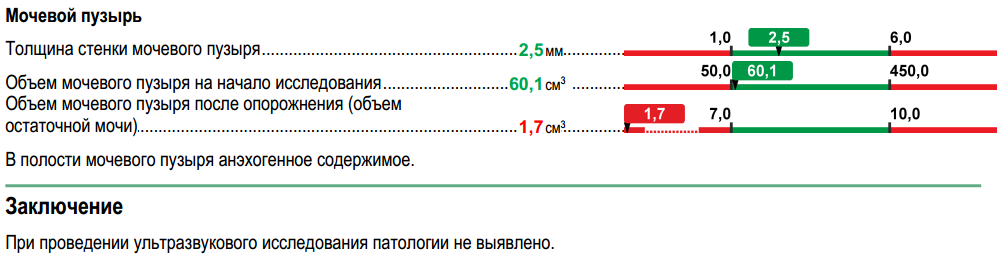
All these tags can be found, for example, in the bladder ultrasound template:
<template> <anatomy id="119" font-size="10" font-bold="true" font-underline="false" comment=" " /> <measurement id="663" comment=" " /> <measurement id="664" comment=" " /> <measurement id="665" comment=" ( )" /> <anatomy-comment comment-id="94" comment-type="comment" /> <conclusion-label spacing-before="HALF"/> <anatomy-comment comment-id="4" comment-type="conclusion" /> </template>
Text
Designed to display plain text. Attributes:
- text-label - the displayed text;
- max-width - the width of the element;
- font-size, font-bold, font-underline - font settings;
- is-color-selection is highlighted in green. Options: true and false. The default is false.
Measurement-group
Used to display an entity group of dimensions. Inside this tag you can put the
measurement and
text tags. Attributes:
- id - number of the measurement group in the database;
- is-color-selection is highlighted in green. Options: true and false. Default is false;
- multi-interval - used to display reference intervals, when 2 measurements with them are located in one line. Options: true and false. Default is false;
- show-through-slash — show measurements through /. The options are true and false. The default is false.
The tag can be used in two ways. The first way is to specify only the
measurement-group tag with the necessary attributes. The system, for its part, will automatically add all measurements that belong to this group of measurements. For example, in the pattern of ultrasound of the liver and gallbladder for the gallbladder is indicated:
<anatomy id="84" font-size="10" font-bold="true" font-underline="false" comment=" "/> <measurement-group id="7"/> <measurement id="429" comment=" "/> <measurement id="430" comment=" "/> <anatomy-comment comment-id="171" comment-type="comment" comment=" "/>

The second way is to specify the
measurement-group tag with the necessary attributes and internally refine some attributes of the measurement tags or add a tag with text. For example, in the BCA ultrasound pattern, the following code is used to display information for the common carotid artery:
Part of the BSA Ultrasound Template <line comment="-"> <text text-label=" " /> <text text-label="" max-width="197" is-color-selection="true" /> <text text-label="" max-width="197" is-color-selection="true" /> </line> <anatomy id="261" font-size="10" font-bold="true" font-underline="false" comment=" " /> <measurement-group id="11" multi-interval="true" comment=" : "> <measurement id="609" unit-width="19" max-width="295" measurement-name=" (Vps)" comment="" /> <measurement id="606" unit-width="19" empty-name="true" comment="" /> </measurement-group> <measurement-group id="12" multi-interval="true" comment=" : "> <measurement id="610" unit-width="19" max-width="295" measurement-name=" " comment="" /> <measurement id="607" unit-width="19" empty-name="true" comment="" /> </measurement-group>

To render the right-to-left inscription, an already familiar
text tag and a new
line are used , which will be decoded below.
In any rule, you can always find an exception. It also happened with blood pressure. This is exactly the measurement group that defined the new way of displaying groups: measurement values are written using a slash, and reference intervals are located next to each other:
<measurement id="1577" max-width="247" need-points-to-end="false" measurement-name=" " /> <measurement-group id="81" show-through-slash="true" multi-interval="true"> <measurement id="1581" unit-width="27" measurement-name=" " comment=" " /> <measurement id="1582" unit-width="27" max-width="190" empty-name="true" comment=" " /> </measurement-group> <measurement id="1621" comment=" " />

Line
All elements inside this tag are located in one line. The main difference of the
line tag from the
measurement-group is that the
line visually combines data unrelated to each other. Inside there may be
anatomy ,
measurement and
text tags. The tag uses the
is-color-selection and
multi-interval attributes, the behavior of which corresponds to the same attributes in the
measurement-group .
For example, in the CT scan pattern of the brain, the following measurements can be found:
Part of the CT pattern of the brain <line> <measurement id="2801" measurement-name=" " /> <measurement id="2782" measurement-name=" " /> <measurement id="2781" max-width="145" measurement-name="" comment=" "/> </line> <line> <measurement id="2762" measurement-name=" " /> <measurement id="2763" measurement-name=" " /> <measurement id="2764" max-width="145" measurement-name=" " /> </line> <line> <measurement id="2743" measurement-name=" " /> <text max-width="247" text-label=" " /> </line> <line> <measurement id="2803" max-width="169" measurement-name="" /> <measurement id="2767" value-width="148" comment=" "/> </line> <line> <measurement id="2821" measurement-name=" " /> <measurement id="2841" measurement-name=" " /> </line>

Well, there are still a few tags, but let's move on to the lyrics, and then to a dry description of the remaining "good."
Each template is tied to a specific price (service). All prices, in turn, are distributed between price groups. The latter are already included in any modalities. For example:
- cervical spine (service) - neck (price group) - magnetic resonance imaging [MRI] (modality);
- cervical spine (service) - neck (price group) - computed tomography [CT] (modality);
- Consultation of a general practitioner (service) - therapy (price group) - consultation and manipulation [CM] (modality);
- kidneys and adrenal glands (service) - abdominal cavity (price group) - ultrasound [ultrasound] (modality).
If we consider the price in more detail, then the following types can be distinguished for it:
- main;
- additional;
- analysis.
Additional services and analyzes are always associated with the main ones and cannot be paid for and performed separately from them. In general, the introduction of additional services within the framework of the main service not only increases the amount of information obtained during the survey (relevant for research conducted on various equipment), but also makes it easy to introduce into the IIA the concept of primary and repeated visits by a specialist doctor.
Consider a reception to the therapist. If we translate the idea of the primary reception into the language of prices, we get that this reception consists of the prices of consultation of the general practitioner (main price) and examination of the general practitioner (add. Price). In the meantime, re-admission is only a price consultation. Similarly for other professionals. This approach of dividing the reception into two separate price lists allows the patient to issue a report with only the necessary information.
When generating the study protocol, the current version of the template is taken into account, which is tied to the current main price list. If the patient pays, for example, the service "ultrasound scan of the pancreas" or "consultation of a general practitioner", then there are no questions when it is displayed to the doctor. But what to do if not only the consultation of the general practitioner is paid, but also an examination? How, then, add a template tied to a doctor's examination?
Not less interesting is the display of the study protocol for laboratory diagnostics (LD), which uses a different approach from additional price lists. That is why a separate type of price list was selected for analysis. Each main LD price list (a smear / scraping test, a urine test, etc.) in this case serves to combine several price lists with the “analysis” type, belonging to different price groups, into a single whole. As a result, only one research protocol is issued for each main price list, regardless of the number of paid analyzes. If, for example, several blood tests were ordered (the main price is a blood test) and a urological smear (the main price is a smear / scraping test), two conclusions will be issued.
We must not forget that some places in different templates can be duplicated, or the template is banally very large, and it is difficult to navigate. For example, a set of measurements for the right and left tonsils are found in examinations by a general practitioner, an endocrinologist, a pulmonologist, and so on.
Thus, it becomes necessary, first, to isolate a fragment of XML code into a separate template and then add it to a special place, and, second, to attach paid price lists or analyzes to the main template. For these tasks we need the remaining three tags.
Surely the question arose: why use some special tags when you can simply add one template to the end of another, while receiving a kind of locomotive with cars? Yes, there is such a way. However, the template system must be flexible and be able to insert different templates in the place that we need, while observing a certain order.
Template builder
Used as a link to another template. The
id attribute indicates the number of the template to be inserted.
As an example, we give the patterns of the right and left tonsils, which are used in the pattern of examination of specialists.
Right tonsil pattern <template> <line> <anatomy id="524" font-size="10" font-bold="true" font-underline="false" comment=" " /> <measurement id="1542" max-width="112" empty-name="true" comment=" " /> <measurement id="1543" max-width="161" empty-name="true" comment=" " /> </line> <line> <measurement id="1550" measurement-name="" comment=" " /> <measurement id="1551" measurement-name="" comment=" " /> <measurement id="1552" measurement-name="" comment=" " /> </line> </template>
Left tonsil pattern <template> <line> <anatomy id="525" font-size="10" font-bold="true" font-underline="false" comment=" " /> <measurement id="1554" max-width="112" empty-name="true" comment=" " /> <measurement id="1555" max-width="161" empty-name="true" comment=" " /> </line> <line> <measurement id="1556" measurement-name="" comment=" " /> <measurement id="1557" measurement-name="" comment=" " /> <measurement id="1558" measurement-name="" comment=" " /> </line> </template>
The part of the specialist's examination template, where the template with the number 516 is for the right tonsil and 517 is for the left tonsil:
<template-builder id="516"/> <anatomy-comment comment-id="372" comment-type="comment" comment=" " /> <template-builder id="517"/> <anatomy-comment comment-id="373" comment-type="comment" comment=" " />

Price-template-builder
Indicates the insertion of a template, the presence of which depends on the payment. For example, a medical examination, various tests. It contains only one
id attribute, where the template number is written.
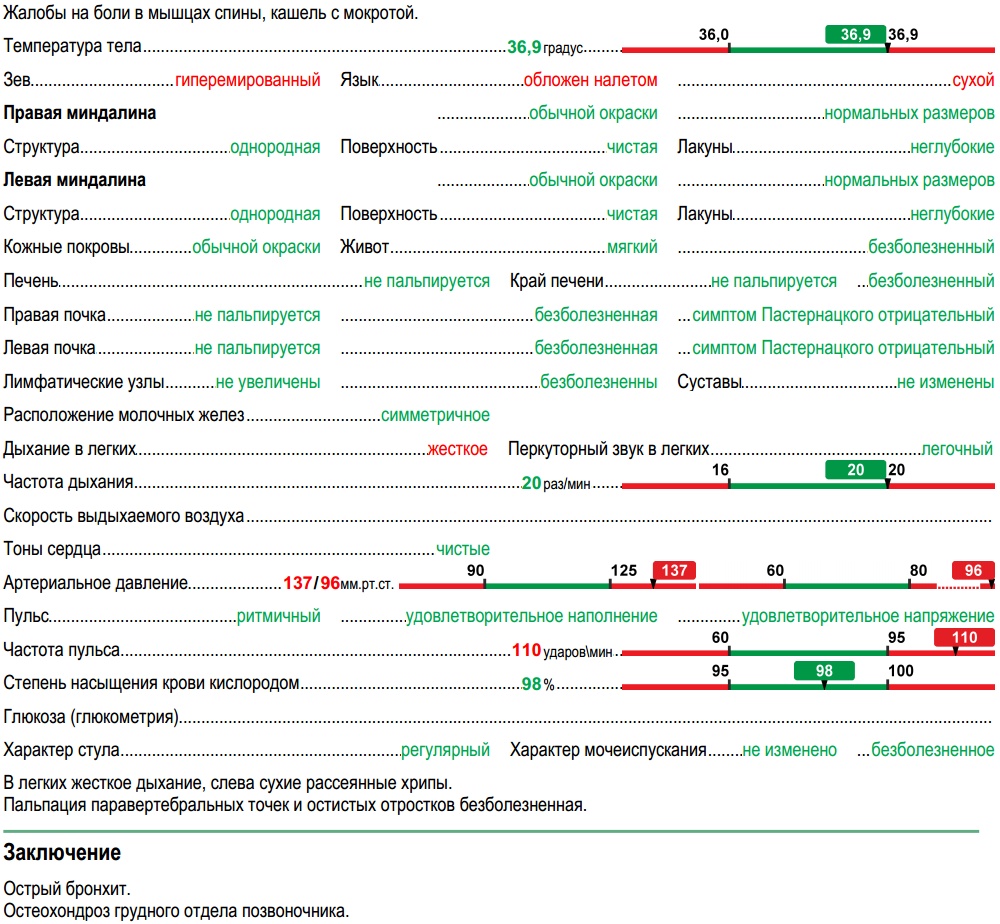
Therapist consultation template:
<template> <price-template-builder id="336"/> <anatomy-comment comment-id="370" comment-type="comment" comment=" " /> <conclusion-label spacing-before="HALF"/> <anatomy-comment comment-id="371" comment-type="conclusion" comment=" " /> </template>

Therapist Examination Template <template> <anatomy-comment comment-id="358" comment-type="complaint" comment=" " /> <measurement id="8541" comment=" " /> <line> <measurement id="1521" measurement-name="" comment=" " /> <measurement id="1559" measurement-name="" comment=" " /> <measurement id="1560" empty-name="true" comment=" " /> </line> <template-builder id="516"/> <anatomy-comment comment-id="372" comment-type="comment" comment=" " /> <template-builder id="517"/> <anatomy-comment comment-id="373" comment-type="comment" comment=" " /> <line> <measurement id="1181" comment=" " /> <measurement id="1182" measurement-name="" comment=" " /> <measurement id="1183" empty-name="true" comment=" " /> </line> <line> <measurement id="1561" max-width="247" measurement-name="" comment=" " /> <measurement id="1562" measurement-name=" " comment=" " /> <measurement id="1563" max-width="70" empty-name="true" comment=" " /> </line> <line> <measurement id="1564" measurement-name=" " comment=" " /> <measurement id="1565" empty-name="true" comment=" " /> <measurement id="1566" empty-name="true" comment=" " /> </line> <line> <measurement id="1567" measurement-name=" " comment=" " /> <measurement id="1568" empty-name="true" comment=" " /> <measurement id="1569" empty-name="true" comment=" " /> </line> <line> <measurement id="1570" measurement-name=" " comment=" " /> <measurement id="1571" empty-name="true" comment=" " /> <measurement id="1572" comment=""/> </line> <measurement id="1153" max-width="247" need-points-to-end="false" comment=" "/> <line> <measurement id="1573" measurement-name=" " /> <measurement id="1574" comment=" " /> </line> <measurement id="1575" comment=" " /> <measurement id="1576" comment=" " /> <measurement id="1577" max-width="247" need-points-to-end="false" measurement-name=" " /> <measurement-group id="81" show-through-slash="true" multi-interval="true" is-color-selection="false"> <measurement id="1581" unit-width="27" measurement-name=" " comment=" " /> <measurement id="1582" unit-width="27" max-width="190" empty-name="true" comment=" " /> </measurement-group> <line> <measurement id="1578" measurement-name="" comment=" " /> <measurement id="1579" empty-name="true" comment=" " /> <measurement id="1580" empty-name="true" comment=" " /> </line> <measurement id="1621" comment=" " /> <measurement id="1583" comment=" " /> <measurement id="1587" comment=" ()" /> <line> <measurement id="1584" max-width="247" comment=" " /> <measurement id="1585" comment=" " /> <measurement id="1586" max-width="70" empty-name="true" comment=" " /> </line> </template>
Price-group
Used to display the price group in the analysis templates. May contain a tag
price-template-builder . Attributes:
- id - number of the price group from the database;
- bgcolor - background color;
- fgcolor - text color.
Consider the blood test protocol for paid prices, lipid status, aspartate aminotransferase (AsAT), alanine aminotransferase (AlAT), total testosterone, estradiol, prolactin, somatotropic hormone (STH).
Part of the blood test pattern <template> <price-group id="9" bgcolor="#E18C8E" fgcolor="#FFFFFF"> <price-template-builder id="368"/> <price-template-builder id="369"/> <price-template-builder id="370"/> <price-template-builder id="371"/> <price-template-builder id="372"/> <price-template-builder id="373"/> <price-template-builder id="374"/> <price-template-builder id="375"/> <price-template-builder id="379"/> </price-group> <price-group id="10" bgcolor="#E18C8E" fgcolor="#FFFFFF"> <price-template-builder id="380"/> <price-template-builder id="381"/> <price-template-builder id="382"/> <price-template-builder id="383"/> <price-template-builder id="384"/> <price-template-builder id="385"/> <price-template-builder id="716"/> <price-template-builder id="717"/> </price-group> <price-group id="17" bgcolor="#E18C8E" fgcolor="#FFFFFF"> <price-template-builder id="425"/> <price-template-builder id="426"/> <price-template-builder id="427"/> <price-template-builder id="428"/> <price-template-builder id="429"/> <price-template-builder id="430"/> <price-template-builder id="431"/> <price-template-builder id="432"/> </price-group> <price-group id="31" bgcolor="#E18C8E" fgcolor="#FFFFFF"> <price-template-builder id="445"/> <price-template-builder id="446"/> </price-group> <anatomy-comment comment-id="6"/> </template>
Template for lipid status (number in the database - 379):
<template> <measurement id="36" comment=""/> <measurement id="37" comment=" "/> <measurement id="38" comment=" ()"/> <measurement id="39" comment=" ()"/> <measurement id="40" comment=" ("/> <measurement id="41" comment=" "/> </template>
Template for alanine aminotransferase (AlAT) (number in the database - 381):
<template> <measurement id="43" comment=" ()"/> </template>

The system has a couple of attributes that can be found in all tags:
- comment - ignored by the system and acts as a tag for the developer;
- spacing-before - additional distance between lines. Options: NONE, HALF, FULL. The default is NONE;
- is-short - indicates the type of string: normal (false) or short (true). The default is false.
Using the
is-short attribute, you can make a study protocol, where the main picture is on the left, and various measurements and groups of measurements are on the right. One of these findings is an ultrasound scan of the thyroid gland, a template of which is given below:
Thyroid Ultrasound Template <template image-id="5" need-warning="true" image-position="left-top-corner"> <anatomy id="22" font-size="10" font-bold="true" font-underline="false" is-short="true" comment=" "/> <line is-short="true" spacing-before="HALF"> <measurement id="310" max-width="156" comment=""/> <measurement id="341" max-width="156" comment=""/> </line> <line is-short="true"> <measurement id="308" max-width="156" comment=""/> <measurement id="342" max-width="156" comment=""/> </line> <template-builder id="253" is-short="true"/> <template-builder id="254" is-short="true"/> <measurement id="307" is-short="true" measurement-name=" " spacing-before="HALF" /> <measurement id="309" measurement-name=" " /> <anatomy-comment comment-id="9" comment-type="comment" spacing-before="HALF" /> <conclusion-label spacing-before="HALF"/> <anatomy-comment comment-id="8" comment-type="conclusion" /> </template>
Template right share:
<template> <anatomy id="24" font-size="10" font-bold="true" font-underline="false" spacing-before="HALF" is-short="true" comment=" "/> <measurement-group id="2" is-color-selection="true" is-short="true"/> </template>
Pattern left lobe:
<template> <anatomy id="23" font-size="10" font-bold="true" font-underline="false" spacing-before="HALF" is-short="true" comment=" "/> <measurement-group id="1" is-color-selection="true" is-short="true"/> </template>

We have already mentioned that various metamorphoses occur with a person during the course of life. The remaining tags are intended to describe them, and they will be considered next time.