In the last two articles, we talked about IIoT - the industrial Internet of things - built architecture to receive data from the sensors, soldered the sensors themselves. The cornerstone of IIoT architectures and indeed any architectures working with BigData is stream data processing. It is based on the concept of messaging and queuing. Apache Kafka has now become the standard for working with messaging. However, in order to understand its advantages (and understand its drawbacks), it would be good to understand the basics of the work of the queuing systems as a whole, the mechanisms of their work, usage patterns and basic functionality.
We have found an excellent series of articles that compares the functionality of Apache Kafka and another (unduly ignored) giant among the queuing systems - RabbitMQ. We translated this series of articles, provided us with our own comments and added them. Although the series was written in December 2017, the world of messaging systems (and especially Apache Kafka) is changing so quickly that by the summer of 2018 some things had changed.
A source
RabbitMQ vs Kafka
Messaging is the centerpiece of many architectures, and the two pillars in this area are RabbitMQ and Apache Kafka. To date, Apache Kafka has become almost an industry standard in data processing and analytics, so in this series we will look in detail at RabbitMQ and Kafka in the context of their use in real-time infrastructures.
Apache Kafka is on the rise now, but RabbitMQ seems to have been forgotten. The whole HYIP focused on Kafka, and this happens for obvious reasons, but RabbitMQ is still an excellent choice for messaging. One of the reasons Kafka turned its attention to itself is a general obsession with scalability, and obviously, Kafka is more scalable than RabbitMQ, but most of us don’t have to deal with the scales at which RabbitMQ has problems. Most of us are not Google and not Facebook. Most of us deal with daily message volumes from hundreds of thousands to hundreds of millions, not volumes from billions to trillions (but by the way, there are cases when people scaled RabbitMQ to billions of daily messages).
Thus, in our series of articles we will not talk about cases when extreme scalability is required (and this is Kafka's prerogative), but focus on the unique advantages that each of the systems under consideration offers. Interestingly, each system has its own advantages, but at the same time they are quite different from each other. Of course, I wrote quite a lot about RabbitMQ, but I assure you that I don’t give any special preference to it. I like well-made things, and RabbitMQ and Kafka are both quite mature, reliable and, yes, scalable messaging systems.
We start at the top level, and then we start exploring various aspects of these two technologies. This series of articles is intended for professionals involved in organizing messaging systems or architects / engineers who want to understand the details of the lower level and their application. We will not write code, but instead focus on the functionality offered by both systems, the messaging templates that each of them offers, and the solutions that decision makers and architects must make.
In this part, we will look at what RabbitMQ and Apache Kafka are and their approach to messaging. Both systems are suitable for messaging architecture from different sides, each of which has strengths and weaknesses. In this chapter, we will not come to any important conclusions; instead, we suggest taking this article as a technology guide for beginners, so that we can dive deeper into the next articles in the series.
RabbitMQ
RabbitMQ is a distributed message queue management system. Distributed, since it usually operates as a cluster of nodes, where queues are distributed across nodes and, optionally, replicated for error resilience and high availability. Normally, it implements AMQP 0.9.1 and offers other protocols, such as STOMP, MQTT, and HTTP through additional modules.
RabbitMQ uses both classic and innovative messaging approaches. Classic in the sense that it is focused on the message queue, and innovative in the possibility of flexible routing. This routing feature is its unique advantage. Creating a fast, scalable, and reliable distributed message system is in itself an achievement, but the message routing functionality makes it truly outstanding among a variety of messaging technologies.
Exchange'i and queues
Super simplistic review:
- Publishers send messages to exchange
- Exchange'i send messages to the queues and other exchange'i
- RabbitMQ sends confirmation to publishers when receiving a message
- Recipients (consumers) maintain persistent TCP connections with RabbitMQ and announce which queue (s) they receive
- RabbitMQ pushes messages to recipients
- Recipients send confirmation of success / error
- Upon successful receipt, messages are removed from the queues.
This list hides a huge number of solutions that developers and administrators must make in order to get the necessary delivery guarantees, performance characteristics, etc., each of which we will look at later.
Let's look at an example of working with one publisher, exchange, queue and recipient:

Fig. 1. One publisher and one recipient
What if you have multiple publishers of the same
messages? What if we have several recipients, each of whom wants to receive all messages?

Fig. 2. Several publishers, several independent recipients
As you can see, publishers send their messages to the same exchanger, which sends each message in three queues, each of which has one recipient. In the case of RabbitMQ, the queues allow different recipients to receive all messages. Compare with the chart below:
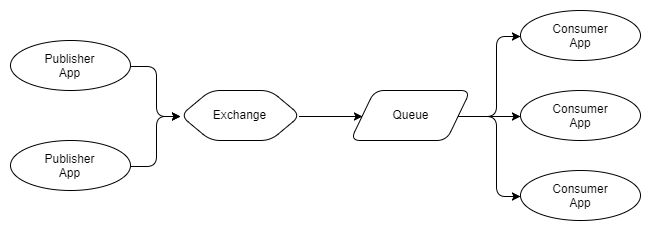
Fig. 3. Multiple publishers, one queue with multiple competing recipients
In Figure 3, we see three recipients that use the same queue. These are competing recipients, that is, they are competing to receive messages from the queue. Thus, it can be expected that, on average, each recipient will receive one third of the messages from the queue. We use competing recipients to scale our message processing system, and using RabbitMQ is very easy to do: add or remove recipients on demand. No matter how many competing recipients you have, RabbitMQ will deliver messages to only one recipient.
We can combine rice. 2 and 3 to receive multiple sets of competing recipients, where each set receives each message.

Fig. 4. Several publishers, several queues with competing recipients
The arrows between exchangers and queues are called bindings, and we'll talk more about them.
Guarantees
RabbitMQ gives guarantees of “one-time delivery” and “at least one delivery”, but not “exactly one delivery”.
Translator's note: up to version Kafka 0.11, delivery of messages exactly-once delivery was not available, currently similar functionality is present in Kafka.
Messages are delivered in the order they arrive at the queue (after all, this is the definition of the queue). This does not guarantee that the completion of message processing is the same as when you have competing recipients. This is not a RabbitMQ error, but the fundamental reality of parallel processing of an ordered set of messages. This problem can be solved using the Consistent Hashing Exchange, as you will see in the next chapter on patterns and topologies.
Pushing and prefetching recipients
RabbitMQ pushes messages to recipients (there is also an API for unloading (pull) messages from RabbitMQ, but at the moment this functionality is outdated). This can overwhelm recipients if messages arrive in a queue faster than recipients can process them. To avoid this, each recipient can configure the prefetch limit (also known as the QoS limit). In fact, the QoS limit is a limit on the number of accumulated messages that have not been confirmed by the recipient. This acts as a fuse when the receiver starts to fall behind.
Why was it decided that the messages in the queue are pushed (push) and not unloaded (pull)? Firstly, because the delay time is less. Secondly, ideally, when we have competing recipients from the same queue, we want to evenly distribute the load between them. If each recipient requests / unloads messages, then depending on how much they request, the distribution of work can become quite uneven. The more uneven the distribution of messages, the greater the delay and further loss of order of messages during processing. These factors orient the RabbitMQ architecture to a one-message-for-push mechanism. This is one of the limitations of RabbitMQ scaling. The restriction is mitigated by the fact that confirmations can be grouped.
Routing
Exchange'i are basically message routers for queues and / or other exchanges. For the message to be moved from exchange to queue or to another exchange, bindings are required. Different exchanges require different bindings. There are four types of exchanges and their associated bindings:
- Fanout (forking). It sends to all queues and exchangers that are linked to the exchange Standard Sub submodel Pub.
- Direct. Routes messages based on the routing key that carries the message, is set by the publisher. The routing key is a short string. Direct exchangers send messages to the / exchange queues that have a pairing key that exactly matches the routing key.
- Topic (thematic). Routes messages based on the routing key, but allows the use of incomplete matching (wildcard).
- Header (header). RabbitMQ allows you to add recipient headers to messages. Header exchanges send messages according to these header values. Each binding includes an exact match of the header values. You can add multiple values to the binding with ANY or ALL values necessary to match.
- Consistent Hashing (consistent hashing). This is an exchanger that hashes either the routing key or the message header, and sends only one queue. This is useful when you need to comply with the guarantees of the processing procedure and at the same time be able to scale the recipients.

Fig. 5. Example exchange exchange
We will consider routing in more detail, but the above is an example of a topic exchange. In this example, publishers publish error logs using the routing key format LEVEL (Error Level) .AppName.
Queue 1 will receive all messages because it uses a wildcard number with a few words.
Queue 2 will receive any logging level of the ECommerce.WebUI application. It uses wildcard *, thus capturing the level of a single naming topic (ERROR.Ecommerce.WebUI, NOTICE.ECommerce.WebUI, etc.).
In queue 3 all ERROR level messages from any application will be displayed. It uses wildcard # to cover all applications (ERROR.ECommerce.WebUi, ERROR.SomeApp.SomeSublevel, etc.).
Thanks to the four ways of routing messages and with the ability to exchange messages to transfer to other exchanges and RabbitMQ, you can use a powerful and flexible set of message exchange templates. Then we will talk about exchanges with undelivered messages (dead letter exchange), exchanges and queues without data (ephemeral exchanges and queues), and RabbitMQ will unfold in full power.
Exchange'and undelivered messages
Translator's note: When messages from the queue cannot be received for one reason or another (there is not enough consumer power, network problems, and so on), they can be postponed and processed separately.
We can configure the queues so that messages are sent to exchange under the following conditions:
- The queue exceeds the specified number of messages.
- The queue exceeds the specified number of bytes.
- Message transmission time (TTL) expired. A publisher can set the lifetime of the message, and the queue itself can also have a specified TTL for the message. In this case, a shorter TTL of the two will be used.
We create a queue that is linked to exchanges with undelivered messages, and these messages are stored there until any action is taken.
Like many functions of RabbitMQ, exchanges with undelivered messages make it possible to use templates that were not originally intended. We can use TTL messages and exchange'and with undelivered messages to implement pending queues and re-queues.
Exchangers and queues without data
Exchange'i and queues can be created dynamically, while you can set criteria for their automatic removal. This allows templates such as response-based message-based RPCs to be used.
Additional modules
The first plug-in you probably want to install is a management plugin that provides an HTTP server with a web interface and a REST API. It is very easy to install and has an easy to use interface. Deploying scripts through the REST API is also very simple.
Besides:
- Consistent Hashing Exchange, Sharding Exchange and more
- protocols like STOMP and MQTT
- web hooks
- additional types of exchangers
- SMTP integration
There are many more things that can be told about RabbitMQ, but this is a good example that allows you to describe what RabbitMQ can do. Now we look at Kafka, which uses a completely different approach to messaging and, in doing so, also has its own set of distinctive, interesting features.
Apache kafka
Kafka is a distributed replicated change log. Kafka has no concept of queuing, which may seem strange at first, considering that it is used as a messaging system. Queues have long been synonymous with messaging systems. Let's first understand what “distributed, replicated change commit log” means:
- Distributed because Kafka is deployed as a cluster of nodes, both for error resilience and for scaling
- Replicated because messages are usually replicated on several nodes (servers).
- Change commit log because messages are stored in segmented, append-only journals called topics. This concept of journaling is Kafka'i’s main unique advantage.
Understanding the journal (and topic) and partitions is the key to understanding Kafka'i. So how does a parting log differ from a set of queues? Let's imagine what it looks like.
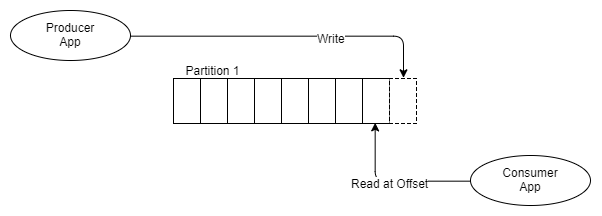
Fig. 6 One producer, one segment, one recipient
Instead of placing messages in the FIFO queue and tracking the status of this message in the queue, as RabbitMQ does, Kafka simply adds it to the log, and that’s it.
The message remains, regardless of whether it will be received one or several times. It is removed in accordance with the data retention policy (retention policy, also called window time period). How does the information is taken from the topic?
Each recipient keeps track of where it is in the log: there is a pointer to the last message received and this pointer is called the offset address. Recipients support this address through client libraries, and depending on the version of Kafka, the address is stored either in ZooKeeper or in Kafka itself.
A distinctive feature of the journaling model is that it instantly eliminates many difficulties regarding the status of message delivery and, more importantly for recipients, allows them to rewind, return and receive messages at the previous relative address. For example, imagine that you are deploying a service that issues invoices that take into account orders placed by customers. The service had an error, and it incorrectly calculates all bills for 24 hours. With RabbitMQ at best, you will need to somehow re-publish these orders only on the invoice service. But with Kafka, you simply move the relative address for this recipient 24 hours ago.
So let's see how this looks when there is a topic in which there is one partition and two recipients, each of which should receive each message.

Fig. 7. One Producer, One Partition, Two Independent Recipients
As can be seen from the diagram, two independent recipients receive one and the same partition, but read at different offset addresses. Perhaps the billing service processes messages longer than the push notification service. or maybe the billing service was unavailable for a while and tried to catch up later. Or maybe there was a mistake, and the offset address had to be postponed for several hours.
Now suppose that the billing service needs to be divided into three parts, because it cannot keep up with the speed of the message. With RabbitMQ, we simply deploy two more billing service applications that are received from the billing service queue. But Kafka does not support competing recipients in the same partition, the Kafka parallelism block is the partition itself. Therefore, if we need three recipient accounts, we need at least three partitions. So now we have:
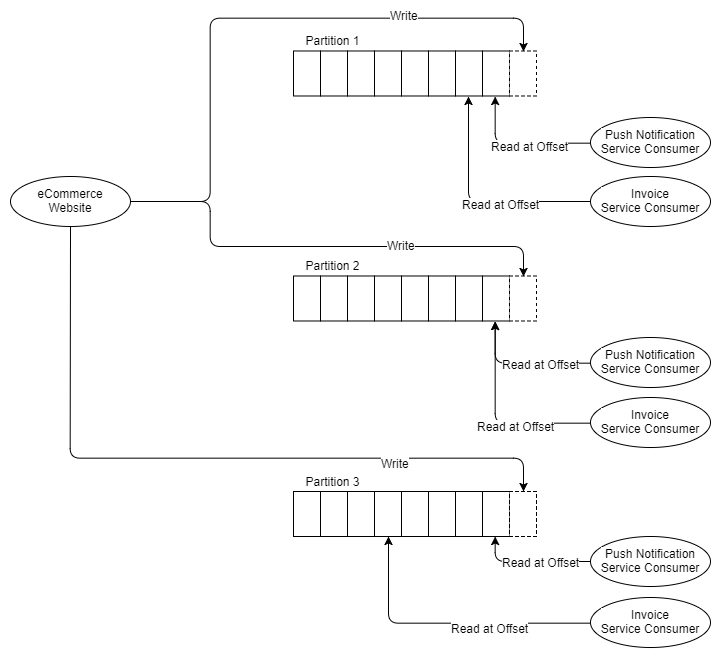
Fig. 8. Three partitions and two groups of three recipients
Thus, it is assumed that you need at least as many partitions as the recipient of the most horizontally scaled horizontal. Let's talk a little about partitions.
Partitions and recipient groups
Each partition is a separate file in which the order of messages is guaranteed. This is important to remember: the order of messages is guaranteed only in one partition. In the future, this may lead to some contradiction between the need for message queuing and performance needs, since Kafka's performance is also scaled by partitions. Partition cannot support competing recipients, so our billing application can only use one part for each section.
Messages can be redirected to segments by a cyclic algorithm or through a hashing function: hash (message key)% number of partitions. Using the hash function has some advantages, since we can create message keys so that messages from a single object, for example, reservation information that needs to be processed sequentially, always go into one segment. This allows you to use many templates for queuing and guaranteeing the order of messages.
Recipient groups are similar to competing RabbitMQ recipients. Each recipient in a group is part of the same application and will process a subset of all messages in the subject. While all competing RabbitMQ recipients are received from the same queue, each recipient in the recipient group receives the same theme from different partitions. Thus, in the examples above, all three parts of the account service belong to the same group of recipients.
So far, RabbitMQ looks like a slightly more flexible system with its guarantee of message ordering and a well-integrated ability to cope with changes in the number of competing recipients. With Kafka, it’s important how you allocate logs by partitions.
There is an implicit but important advantage that Kafka had from the very beginning, and RabbitMQ was added later - message ordering and concurrency. RabbitMQ supports the global order of the entire queue, but does not offer a way to maintain this location during its parallel processing. Kafka cannot offer a global layout of the topic, but offers a ranking at the level of the partition. Therefore, if you only need to line up the sequence of related messages, Kafka offers both ordered delivery of messages and ordered processing of messages.
Imagine that you have messages that show the last state of a client’s reservation, so you always want to consistently process messages about this reservation (sequentially). If you partition messages by the booking ID, then all messages about this reservation will come in one partition, where we have the messages arranged. This way, you can create a large number of partitions, which makes your processing extremely parallelized, and also get the necessary guarantees for streamlining messages.
This possibility also exists in RabbitMQ - with the help of the Consistent Hashing exchange, which equally distributes messages across queues. However, the feature of Kafka'i is that Kafka organizes this ordered processing in such a way that only one recipient in each group can receive messages from one partition, and simplifies the work, because to ensure compliance with this rule, all the work for you is done by the node -coordinator. In RabbitMQ, there may still be competing recipients receiving one queue from the partition, and you will have to make sure that this does not happen.
There are also pitfalls here: at the moment when you change the number of partitions, the messages with the number Id 1000 now go to another partition, therefore the messages with the number Id 1000 exist in two partitions. Depending on how you handle the messages, this can cause a problem. Now there are scenarios when messages are processed out of order.
Pushing against pushing
RabbitMQ uses a push model and, thus, message overload by recipients using a pre-set limit configured by the receiver. This is great for low latency messaging and works well for a queue-based RabbitMQ architecture. On the other hand, Kafka uses a pull model, where recipients request batches of messages from a given relative offset. To avoid endless empty loops when no messages exist outside of the current relative address, Kafka allows long-polling.
A pull model makes sense for Kafka because of its segments. Since Kafka guarantees the order of messages in the partition without competing recipients, we can profitably apply message packaging for more efficient message delivery, which gives us higher throughput.
This is not particularly important for RabbitMQ, since ideally we want to distribute messages in turn as quickly as possible to ensure uniform parallelism of work, and messages are processed close to the order in which they were in the queue. But with Kafka, the partition is the unit of concurrency and ordering of messages, so neither of these two factors is a problem for us.
Publish and subscribe
Kafka supports the producer / subscriber base template with some additional templates related to the fact that it is a magazine and it has partitions. Producers add messages to the end of the journal sections, and recipients with their relative addresses can be placed anywhere in the partition.
Fig. 9. Recipients with different relative addresses.
This style of the diagram is not so easy to interpret when there are several partitions and recipient groups, so for the rest of the diagrams for Kafka I will use the following style:
Fig. 10. One producer, three partitions and one group of three recipients

There is no need to have the same number of recipients in our group of recipients, since there are partitions:

Fig. 11. Some recipients read from several partitions.
Recipients in one group of recipients will coordinate the receipt of partitions, ensuring that one partition is not received by more than one recipient from the same group of recipients.
Similarly, if we have more recipients than partitions, the additional recipient will remain inactive, in reserve.

Fig. 12. One inactive recipient
After adding and removing recipients, the group of recipients may become unbalanced. Rebalancing redistributes recipients into partitions as evenly as possible.

Rebalancing automatically starts after:
- the recipient joins the group of recipients
- the recipient leaves the group of recipients (in the case when it is disconnected or starts to be considered non-performing)
- new partitions added
Rebalancing will cause a short period of additional delay in accessing data, while recipients will no longer read batches of messages and will be placed in different partitions. Any state of data in memory that was maintained by the recipient may now become invalid.
One of the Kafka receiving models is the ability to send all messages of a given object, for example, a reservation, to the same partition and, therefore, to the same recipient. This is called data locality. When rebalancing data, any data in the memory of this data will be useless if the recipient is not placed in the same partition. Therefore, recipients who maintain state should be saved externally.
Journal compression
A standard data retention policy is a policy based on time and space. For example, storage until the last week of messages or up to 50 GB. But there is another type of data retention policy - log compression. When the log is compressed, the result is that only the last message for each message key is saved, the rest are deleted.
Imagine that we receive a message containing the current state of the user's reservation. Each time a reservation change occurs, a new event is generated with the current reservation status. This topic may have several messages for this one reservation, which represent the states of this reservation from the time it was created. After the topic has been compressed, only the most recent message associated with this reservation will be saved.
Depending on the number of bookings and the size of each booking, you could theoretically permanently save all bookings in this topic. Periodically squeezing the topic, we guarantee that we save only one message per reservation.
Learn more about organizing messages.
We considered that scaling and maintaining the order of messages at the same time is possible with both RabbitMQ and Kafka, but with Kafka it is much easier. With RabbitMQ, we need to use consistent hashing and manually implement recipient group logic using a distributed generic service, such as ZooKeeper or Consul.
But RabbitMQ has one interesting feature that Kafka does not have. This is not a feature of RabbitMQ itself, but of any subscription-based messaging system. The possibility is this: queue-based messaging systems allow subscribers to organize arbitrary groups of events.
Let's see a little more in detail. Different applications cannot divide the queue among themselves, because then they will compete for receiving messages. They need their own line. This gives applications the freedom to configure their turn in any way they see fit. They can send several types of events from several topics in turn. This allows applications to support the sequencing of related events. The events that need to be combined can be configured differently for each application.
This is simply not possible using a log-based messaging system such as Kafka, since logs are shared resources. Several applications read one magazine. Thus, any grouping of related events in one topic is a decision made at a broader level of the system architecture.
So here the winner is not obvious. RabbitMQ maintains relative order in arbitrary sets of events, and Kafka provides an easy way to maintain ordering with scaling support.
findings
RabbitMQ , . , , . , . , , .
Kafka . , . Kafka , RabbitMQ . , Kafka , RabbitMQ, , .
RabbitMQ.
, , IoT , . : t.me/justiothings