Activiti framework (Java) - a description of the flow of tasks on XML (bpm) and the management of this process. Here I will describe the basic basic concepts and how to build simple business processes.
The basic concept of Activiti is a process (process) and a task (task). The process is all tasks related to each other by directional flows and branches.
I will touch upon such aspects:
- - Activiti in pure form
- - Users, Roles
- - Connecting SpringBoot
- - REST API
- - Job and Delegate
Movement on flows goes steps from a task to a task, each such step suspends the process execution waiting for input data and the task execution, all intermediate actions are saved in the database.
Where, what to take I will point below. Let's start with a simple example - the program development process, which consists of writing code and testing. Below is a process diagram.
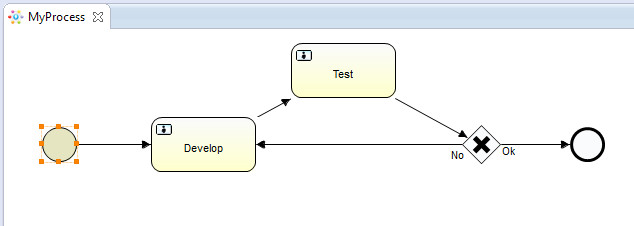
This is all a process, it has the ID, Name and other characteristics.
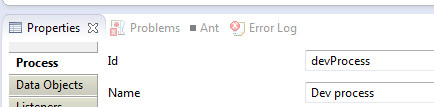
He has:
The beginning of the process, the two tasks “Develop” and “Test”, one branching (gateway) and the end of the process. In words, everything happens like this:
- we load the description of bpm
- we start the process
- after the start we immediately get into the task Develop
- after the execution of Develop, it goes into testing and, based on the test result, the process ends or returns to development again.
Activiti consists of some set of services.
Here are the main ones:
- RepositoryService: manages the loading of process descriptions
- RuntimeService: starts processes
- TaskService: performs tasks
- FormService: access to task variables
- HistoryService: access to the history of the process
- IdentityService: Users and Roles
Activiti in pure form
But it all starts with the configuration and file - activiti.cfg.xml.
Here from this
ProcessEngineConfiguration cfg = ProcessEngineConfiguration .createProcessEngineConfigurationFromResource("activiti.cfg.xml");
If you don’t use your configuration, then Activiti will deploy the database in memory of H2 itself, which doesn’t suit me, but my favorite Oracle is quite possible to connect different databases.
Here is my configuration
activiti.cfg.xml <?xml version="1.0" encoding="UTF-8"?> <beans xmlns="http://www.springframework.org/schema/beans" xmlns:xsi="http://www.w3.org/2001/XMLSchema-instance" xsi:schemaLocation="http://www.springframework.org/schema/beans http://www.springframework.org/schema/beans/spring-beans.xsd"> <bean id="processEngineConfiguration" class="org.activiti.engine.impl.cfg.StandaloneProcessEngineConfiguration"> <property name="jdbcUrl" value="jdbc:oracle:thin:@localhost:1521:xe" /> <property name="jdbcDriver" value="oracle.jdbc.driver.OracleDriver" /> <property name="jdbcUsername" value="BPM" /> <property name="jdbcPassword" value="1" /> <property name="databaseSchemaUpdate" value="false" /> <property name="asyncExecutorActivate" value="false" /> <property name="mailServerPort" value="5025" /> </bean> </beans>
Change the values in "property name = jdbc *" and connect another database
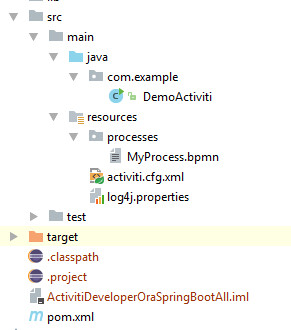
Project structure
POM <?xml version="1.0" encoding="UTF-8"?> <project xmlns="http://maven.apache.org/POM/4.0.0" xmlns:xsi="http://www.w3.org/2001/XMLSchema-instance" xsi:schemaLocation="http://maven.apache.org/POM/4.0.0 http://maven.apache.org/xsd/maven-4.0.0.xsd"> <modelVersion>4.0.0</modelVersion> <groupId>DemoActiviti</groupId> <artifactId>DemoActiviti</artifactId> <version>1.0-SNAPSHOT</version> <properties> <project.build.sourceEncoding>UTF-8</project.build.sourceEncoding> <java.version>1.8</java.version> </properties> <dependencies> <dependency> <groupId>org.activiti</groupId> <version>6.0.0</version> <artifactId>activiti-spring-boot-starter-integration</artifactId> </dependency> <dependency> <groupId>org.slf4j</groupId> <artifactId>slf4j-api</artifactId> <version>1.7.21</version> </dependency> <dependency> <groupId>org.slf4j</groupId> <artifactId>slf4j-log4j12</artifactId> <version>1.7.21</version> </dependency> <dependency> <groupId>com.oracle</groupId> <artifactId>ojdbc6</artifactId> <version>11.2.0</version> </dependency> </dependencies> <build> <plugins> <plugin> <groupId>org.apache.maven.plugins</groupId> <artifactId>maven-assembly-plugin</artifactId> <version>2.4.1</version> <configuration> <descriptorRefs> <descriptorRef>jar-with-dependencies</descriptorRef> </descriptorRefs> <archive> <manifest> <mainClass>com.example.DemoActiviti</mainClass> </manifest> </archive> </configuration> <executions> <execution> <id>make-assembly</id> <phase>package</phase> <goals> <goal>single</goal> </goals> </execution> </executions> </plugin> <plugin> <groupId>org.apache.maven.plugins</groupId> <artifactId>maven-compiler-plugin</artifactId> <configuration> <target>1.8</target> </configuration> </plugin> </plugins> </build> </project>
The presence in the POM of the maven-assembly-plugin plugin will make it possible to build (package) a jar with dependencies and run
java -jar DemoActiviti-1.0-SNAPSHOT-jar-with-dependencies.jar
jdbc driver for Oracle installed in the local maven repository
mvn install:install-file -Dfile={Path/to/your/ojdbc6.jar} -DgroupId=com.oracle -DartifactId=ojdbc6 -Dversion=11.2.0 -Dpackaging=jar
log4j log4j.rootLogger=WARN, ACT log4j.appender.ACT=org.apache.log4j.ConsoleAppender log4j.appender.ACT.layout=org.apache.log4j.PatternLayout log4j.appender.ACT.layout.ConversionPattern= %d{hh:mm:ss,SSS} [%t] %-5p %c %x - %m%n
For this process, we define 4 actions: bpm loading, process start, development and testing. Each action will have a corresponding parameter: deploy, start, develop, test.
Scripts for a database we take from
activiti-get-startedthere in the folder \ activiti-6.0.0 \ activiti-6.0.0 \ database \ create - scripts for creating the database
Users, Roles
Prepare users and roles:
Identity public class DemoActiviti { private static final String DEV_PROCESS = "devProcess"; public static void main(String[] args) { Locale.setDefault(Locale.ENGLISH); ProcessEngineConfiguration cfg = ProcessEngineConfiguration .createProcessEngineConfigurationFromResource("activiti.cfg.xml"); ProcessEngine processEngine = cfg.buildProcessEngine(); createIdentity(processEngine, "programmer", "programmers"); createIdentity(processEngine, "tester", "testers"); } public static void createIdentity(ProcessEngine processEngine, String userName, String userGroup) { IdentityService identityService = processEngine.getIdentityService(); String userId = userName + "Id"; if (identityService.createUserQuery().userId(userId).count() == 0) { User user = identityService.newUser(userName); user.setId(userId); user.setEmail(userName + "@gmail.com"); identityService.saveUser(user); System.out.println("user created success fully"); } String groupId = userGroup + "Id"; if (identityService.createGroupQuery().groupId(groupId).count() == 0) { Group group = identityService.newGroup(userGroup); group.setName(userGroup); group.setId(groupId); identityService.saveGroup(group); System.out.println("group created success fully"); } if (identityService.createGroupQuery().groupId(groupId).list().size() > 0) { identityService.createMembership(userId, groupId); System.out.println("user to group success fully"); } } }
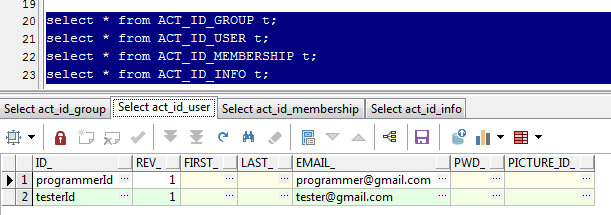
Create users and groups, developer and tester, respectively.
In the database, all tables are divided by the corresponding services and have prefixes
ACT_RE_ *: repository.
ACT_RU_ *: runtime.
ACT_ID_ *: identity.
ACT_HI _ *: history
and so forth
After creating users from, you can see here.
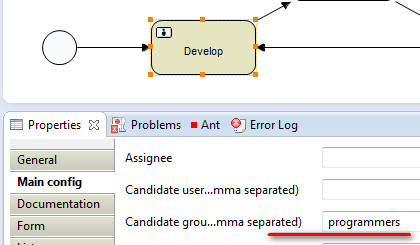
We assign our tasks in the description to the appropriate groups (CandidateGroup), for example, the task Develop for the group - programmers
And so the first thing we do is put in the database “MyProcess.bpmn”, launch the program with the command
deploy java -jar DemoActiviti-1.0-SNAPSHOT-jar-with-dependencies.jar deploy
Next, we start the start process.
java -jar DemoActiviti-1.0-SNAPSHOT-jar-with-dependencies.jar start
After the delpoy and start process, the corresponding entries will appear in the database.
Repository

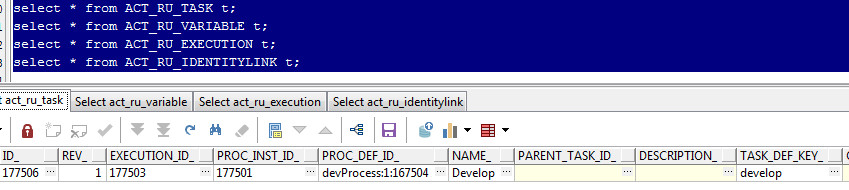
Runtime, what a task on execution
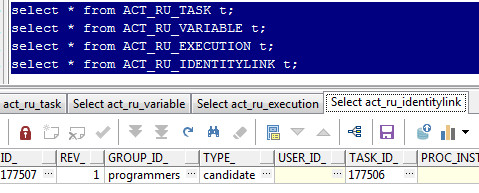
who is assigned
In the code it looks like this (the full code will be lower):
deploy deployment = repositoryService.createDeployment() .addClasspathResource("processes/MyProcess.bpmn").deploy()
start ProcessInstance myProcess = runtimeService.startProcessInstanceByKey(DEV_PROCESS);
developYou can then proceed to the development task.
java -jar DemoActiviti-1.0-SNAPSHOT-jar-with-dependencies.jar develop
// tasks = taskService.createTaskQuery().taskCandidateGroup("programmers").list();
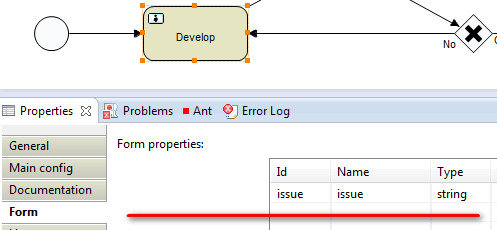
In the Develop task, one variable “issue” is defined.
After processing the variables using the FormService, the task is executed
for (Task task : tasks) { System.out.println("Task:" + task.getTaskDefinitionKey() + ", id=" + task.getId()); FormData formData = formService.getTaskFormData(task.getId()); Map<String, Object> variables = new HashMap<String, Object>();
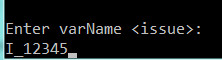
For the task Develop you will be prompted to enter a variable
In the historical table you can see the variables and values of the task, process

Thus, the process after the Develop task will stop on it, the state will be saved in the database.
In general, the cycle looks like this:
Request a task to the performer
tasks = taskService.createTaskQuery().taskCandidateGroup("...").list();
Variable definition
Map<String, Object> variables = new HashMap<String, Object>(); ... variables.put("var_1", value);
Task execution
taskService.complete(task.getId(), variables);
Checking the end of the process
ProcessInstance processInstance = runtimeService.createProcessInstanceQuery() .processInstanceId(processInstance.getId()).singleResult(); if (processInstance != null && !processInstance.isEnded())
After each task execution, the process is suspended until the new task is completed.
So after developing Develop, let's move on to the Test task, here we will also be prompted to enter the variable “devResult” - the result of the development (it didn't work out quite correctly, even before the start of Test, we enter the result), and then the result will be branching or ending (Ok) or again on the development (No), see the process diagram.
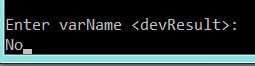
In this case, the development, etc. If you now request tasks for a developer, they will be, but not for testing.
Program code package com.example; import org.activiti.engine.*; import org.activiti.engine.form.FormData; import org.activiti.engine.form.FormProperty; import org.activiti.engine.repository.Deployment; import org.activiti.engine.runtime.ProcessInstance; import org.activiti.engine.task.Task; import org.apache.commons.lang3.StringUtils; import java.util.*; public class DemoActiviti { private static final String DEV_PROCESS = "devProcess"; public static void main(String[] args) { Locale.setDefault(Locale.ENGLISH); ProcessEngineConfiguration cfg = ProcessEngineConfiguration .createProcessEngineConfigurationFromResource("activiti.cfg.xml"); ProcessEngine processEngine = cfg.buildProcessEngine(); RepositoryService repositoryService = processEngine.getRepositoryService(); String mode = StringUtils.EMPTY; if (args.length > 0) { mode = args[0]; } System.out.println("Processes mode: " + mode); Deployment deployment; if ("deploy".equals(mode)) { deployment = repositoryService.createDeployment() .addClasspathResource("processes/MyProcess.bpmn").deploy(); System.out.println("deploy process success"); System.exit(0); } else { List<Deployment> myProcesses = repositoryService.createDeploymentQuery() .processDefinitionKey(DEV_PROCESS).list(); deployment = myProcesses.get(myProcesses.size()-1); System.out.println("get process success:" + deployment.getId()); }
SpringBoot connection
Modifying the project using Spring
Add dependencies to POM
POM with SpringBoot <parent> <groupId>org.springframework.boot</groupId> <artifactId>spring-boot-starter-parent</artifactId> <version>1.3.1.RELEASE</version> <relativePath/> </parent> <dependencies> <dependency> <groupId>org.activiti</groupId> <artifactId>activiti-spring-boot-starter-basic</artifactId> <version>6.0.0</version> </dependency> <dependency> <groupId>org.activiti</groupId> <version>6.0.0</version> <artifactId>activiti-spring-boot-starter-integration</artifactId> </dependency> ....
DemoActiviti class is now so
DemoActiviti - SpringBootApplication @SpringBootApplication @ImportResource("classpath:activiti.cfg.xml") public class DemoActiviti { public static void main(String[] args) { Locale.setDefault(Locale.ENGLISH); SpringApplication.run(DemoActiviti.class, args); } }
I use a mixed model - when part of the beans are described in the xml configuration (@ImportResource ("classpath: activiti.cfg.xml")), and the other is defined through annotations.
activiti.cfg.xml - spring <?xml version="1.0" encoding="UTF-8"?> <beans xmlns="http://www.springframework.org/schema/beans" xmlns:xsi="http://www.w3.org/2001/XMLSchema-instance" xmlns:mvc="http://www.springframework.org/schema/mvc" xsi:schemaLocation="http://www.springframework.org/schema/beans http://www.springframework.org/schema/beans/spring-beans.xsd http://www.springframework.org/schema/context http://www.springframework.org/schema/context/spring-context-2.5.xsd http://www.springframework.org/schema/tx http://www.springframework.org/schema/tx/spring-tx-3.0.xsd http://www.springframework.org/schema/mvc http://www.springframework.org/schema/mvc/spring-mvc.xsd"> <bean id="dataSource" class="org.springframework.jdbc.datasource.SimpleDriverDataSource"> <property name="url" value="jdbc:oracle:thin:@localhost:1521:xe" /> <property name="driverClass" value="oracle.jdbc.driver.OracleDriver" /> <property name="username" value="BPM" /> <property name="password" value="1" /> </bean> <bean id="transactionManager" class="org.springframework.jdbc.datasource.DataSourceTransactionManager"> <property name="dataSource" ref="dataSource" /> </bean> <bean id="processEngineConfiguration" class="org.activiti.spring.SpringProcessEngineConfiguration"> <property name="dataSource" ref="dataSource" /> <property name="transactionManager" ref="transactionManager" /> <property name="databaseSchemaUpdate" value="true" /> <property name="asyncExecutorActivate" value="false" /> </bean> </beans>
Now Spring is responsible for the configuration, it can be seen
bean id="processEngineConfiguration" class="org.activiti.spring.SpringProcessEngineConfiguration"
Add for SpringBoot standard command line processing, in the form of components
Commandline @Component public class CommandLine implements CommandLineRunner { @Autowired private DemoService demoService; public void run(String... args) { if ("test".equals(args[0])) { demoService.startTest(); } else if ("develop".equals(args[0])) { demoService.startDevelop(); } } }
Which will process all those commands, I will not implement them all, everything is simple, I will show two: test and develop. And add a service to process them.
Demoservice @Service public class DemoService { @Autowired private TaskService taskService; @Autowired private FormService formService; public void startTest() { List<Task> tasks = taskService.createTaskQuery().taskCandidateGroup("testers").list(); if (tasks.isEmpty()) { System.out.println(" "); return; } processTasks(tasks); } public void startDevelop() { List<Task> tasks = taskService.createTaskQuery().taskCandidateGroup("develop").list(); if (tasks.isEmpty()) { System.out.println(" "); return; } processTasks(tasks); } private void processTasks(List<Task> tasks) { Scanner scanner = new Scanner(System.in); for (Task task : tasks) { ...... , }
In the CommandLine Autowir component, the DemoService service, and in it the Activiti services already prepared by Spring
@Autowired private TaskService taskService;
We collect, run as before from the command line.
If you want to use task execution from the Web, then we connect the REST API
REST API
SpringBoot by default will provide the embedded Tomcat server, and then the matter of technology.
In POM, to what is, add spring web dependency
<dependency> <groupId>org.springframework.boot</groupId> <artifactId>spring-boot-starter-web</artifactId> </dependency>
We delete the CommandLine component, now everything will be delivered via the URL via HTTP. Add RestController:
RestController @RestController public class DemoRestController { @Autowired private DemoService demoService; @RequestMapping(value="/test", method= RequestMethod.GET, produces= {MediaType.APPLICATION_JSON_VALUE}) public List<String> startTest(@RequestParam String devResult) { List<String> strings = demoService.startTest(devResult); return strings; } @RequestMapping(value="/develop", method= RequestMethod.GET, produces= MediaType.APPLICATION_JSON_VALUE) public List<String> startDevelop(@RequestParam String issue) { List<String> strings = demoService.startDevelop(issue); return strings; } @RequestMapping(value="/start", method= RequestMethod.GET, produces= MediaType.APPLICATION_JSON_VALUE) public List<String> startProcess() { List<String> strings = demoService.startDevProcess(); return strings; } }
We execute the same commands, slightly modified the responses of the DemoService service, which is Autowire in the controller.
Demoservice @Service public class DemoService { @Autowired private TaskService taskService; @Autowired private FormService formService; @Autowired private RuntimeService runtimeService; public List<String> startTest(String devResult) { List<String> results = new ArrayList<>(); List<Task> tasks = taskService.createTaskQuery().taskCandidateGroup("testers").list(); if (tasks.isEmpty()) { results.add("The tasks for testing are not"); return results; } Object issue = runtimeService.getVariables(tasks.get(0).getProcessInstanceId()).get("issue"); processTasks(tasks, devResult); results.add("Task N " + issue + " - tested, result=" + devResult); return results; } public List<String> startDevelop(String issue) { List<String> results = new ArrayList<>(); List<Task> tasks = taskService.createTaskQuery().taskCandidateGroup("programmers").list(); if (tasks.isEmpty()) { results.add("There are no development tasks"); return results; } processTasks(tasks, issue); Object mIssue = runtimeService.getVariables(tasks.get(0).getProcessInstanceId()).get("issue"); results.add("Task N " + mIssue + " - taken in the develop"); return results; } public List<String> startDevProcess() { List<String> results = new ArrayList<>(); ProcessInstance myProcess = runtimeService.startProcessInstanceByKey("devProcess"); results.add("The process is started #"+myProcess.getId()); return results; } private void processTasks(List<Task> tasks, String param) { for (Task task : tasks) { FormData formData = formService.getTaskFormData(task.getId()); Map<String, Object> variables = new HashMap<>();
we test with use of curl, here is the result:
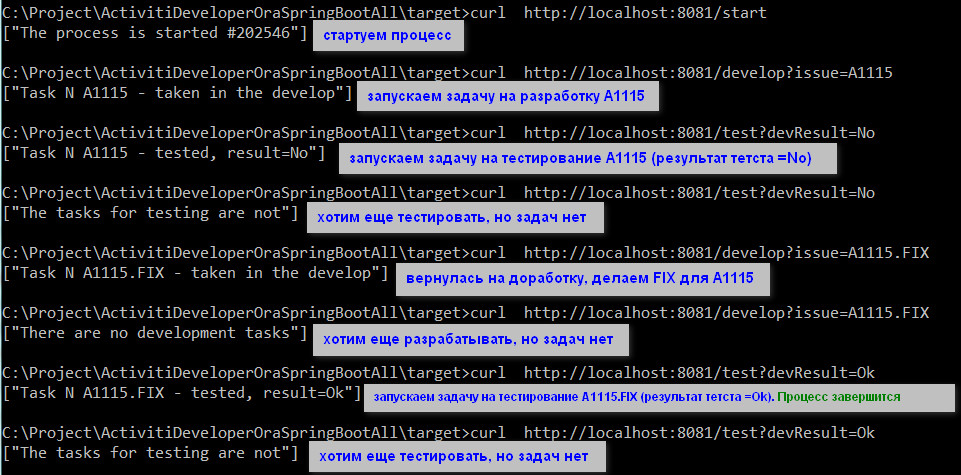
Port for Tomcat I changed to 8081 in application.properties
server.port = 8081
Activiti job
There are many constructions in Activiti, for example, the launch of scheduled tasks is a “TimerStartEvent”. In order for Job to start being executed in the config, you must specify
property name="asyncExecutorActivate" value="true" (see activiti.cfg.xml), then the java process will remain running and will check the schedule and run tasks.
I will return to the initial project, where Activiti is used in its pure form.
In the DemoActiviti class I will leave support for only two commands: deploy and start. I will do a new process.
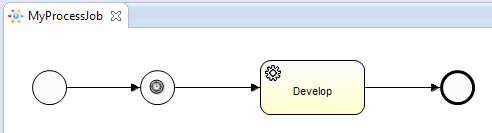
After the process starts, it will go to a timer that will schedule the “Develop” task. The timer schedule will be - run every 10 seconds., Cron expression - “0/10 * * * *?”.
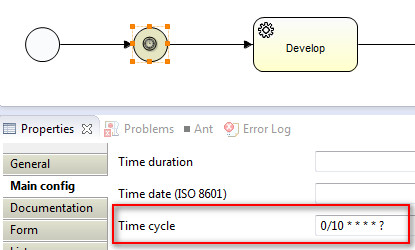
Let’s deploy the new process as before, then start the process (start). All - the task is performed every 10 seconds.
The Activiti component - ServiceTask, which can be specified as the implementation of the Java class, is selected as the task.
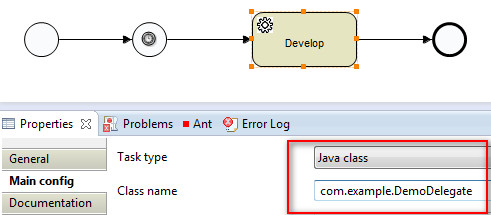
class DemoDelegate public class DemoDelegate implements JavaDelegate { @Override public void execute(DelegateExecution execution) { Date now = new Date(); execution.setVariable("issue", now.toString()); System.out.println("job start="+now); } }
In the table in the database (select * from ACT_RU_TIMER_JOB t) you can see

Job's activity, in the DUEDATE_ field will be the time of the next launch.
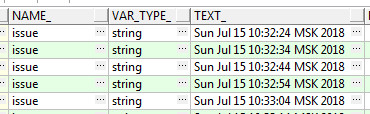
In the execution history, the variable “issue” from Delegate will be fixed.
select * from ACT_HI_VARINST t
code for DemoActiviti c Job public class DemoActiviti { private static final String DEV_PROCESS = "devProcessJob"; public static void main(String[] args) { Locale.setDefault(Locale.ENGLISH); ProcessEngineConfiguration cfg = ProcessEngineConfiguration .createProcessEngineConfigurationFromResource("activiti.cfg.xml"); ProcessEngine processEngine = cfg.buildProcessEngine(); RepositoryService repositoryService = processEngine.getRepositoryService(); String mode = StringUtils.EMPTY; if (args.length > 0) { mode = args[0]; } System.out.println("Processes mode: " + mode); Deployment deployment; if ("deploy".equals(mode)) { deployment = repositoryService.createDeployment() .addClasspathResource("processes/MyProcessJob.bpmn").deploy(); System.out.println("deploy process success"); System.exit(0); } else { List<Deployment> myProcesses = repositoryService.createDeploymentQuery() .processDefinitionKey(DEV_PROCESS).list(); deployment = myProcesses.get(myProcesses.size()-1); System.out.println("get process success:" + deployment.getId()); }
There is still a lot left overboard: Events, Listener, JPA, etc., maybe I’ll come back to them.
Materials
ActivitiEclipse designerdevProcess bpmn <?xml version="1.0" encoding="UTF-8"?> <definitions xmlns="http://www.omg.org/spec/BPMN/20100524/MODEL" xmlns:xsi="http://www.w3.org/2001/XMLSchema-instance" xmlns:xsd="http://www.w3.org/2001/XMLSchema" xmlns:activiti="http://activiti.org/bpmn" xmlns:bpmndi="http://www.omg.org/spec/BPMN/20100524/DI" xmlns:omgdc="http://www.omg.org/spec/DD/20100524/DC" xmlns:omgdi="http://www.omg.org/spec/DD/20100524/DI" typeLanguage="http://www.w3.org/2001/XMLSchema" expressionLanguage="http://www.w3.org/1999/XPath" targetNamespace="http://www.activiti.org/test"> <process id="devProcess" name="Dev process" isExecutable="true"> <startEvent id="startevent1" name="Start" activiti:initiator="programmerId"></startEvent> <userTask id="develop" name="Develop" activiti:candidateGroups="programmers"> <extensionElements> <activiti:formProperty id="issue" name="issue" type="string" required="true"></activiti:formProperty> </extensionElements> </userTask> <sequenceFlow id="flow1" sourceRef="startevent1" targetRef="develop"></sequenceFlow> <userTask id="test" name="Test" activiti:candidateGroups="testers"> <extensionElements> <activiti:formProperty id="devResult" name="devResult" type="string" default="No" required="true"></activiti:formProperty> </extensionElements> </userTask> <sequenceFlow id="flow2" sourceRef="develop" targetRef="test"></sequenceFlow> <exclusiveGateway id="gateway" name="Exclusive Gateway" default="flowNo"></exclusiveGateway> <sequenceFlow id="flow3" sourceRef="test" targetRef="gateway"></sequenceFlow> <sequenceFlow id="flowOk" name="Ok" sourceRef="gateway" targetRef="endevent1"> <conditionExpression xsi:type="tFormalExpression"><![CDATA[${devResult == "Ok"}]]></conditionExpression> </sequenceFlow> <sequenceFlow id="flowNo" name="No" sourceRef="gateway" targetRef="develop"></sequenceFlow> <endEvent id="endevent1" name="End"></endEvent> </process> </definitions>
devProcessJob bpmn <?xml version="1.0" encoding="UTF-8"?> <definitions xmlns="http://www.omg.org/spec/BPMN/20100524/MODEL" xmlns:xsi="http://www.w3.org/2001/XMLSchema-instance" xmlns:xsd="http://www.w3.org/2001/XMLSchema" xmlns:activiti="http://activiti.org/bpmn" xmlns:bpmndi="http://www.omg.org/spec/BPMN/20100524/DI" xmlns:omgdc="http://www.omg.org/spec/DD/20100524/DC" xmlns:omgdi="http://www.omg.org/spec/DD/20100524/DI" typeLanguage="http://www.w3.org/2001/XMLSchema" expressionLanguage="http://www.w3.org/1999/XPath" targetNamespace="http://www.activiti.org/test"> <process id="devProcessJob" name="Dev process Job" isExecutable="true"> <startEvent id="startevent" name="Start" activiti:initiator="programmerId"></startEvent> <sequenceFlow id="flow1" sourceRef="startevent" targetRef="timerstartevent"></sequenceFlow> <endEvent id="endevent" name="End"></endEvent> <startEvent id="timerstartevent" name="Timer start"> <extensionElements> <activiti:formProperty id="issue" name="issue" type="string"></activiti:formProperty> </extensionElements> <timerEventDefinition> <timeCycle>0/10 * * * * ?</timeCycle> </timerEventDefinition> </startEvent> <sequenceFlow id="flow2" sourceRef="timerstartevent" targetRef="servicetask1"></sequenceFlow> <sequenceFlow id="flow3" sourceRef="servicetask1" targetRef="endevent"></sequenceFlow> <serviceTask id="servicetask1" name="Develop" activiti:class="com.example.DemoDelegate"></serviceTask> </process> </definitions>