Foreword
If you are too
lazy to take care of your time, making a level for your game, then you have got to the right place.
This article will tell you in detail how to use one of the
many other methods of generation using the example of mountainous terrain and caves. We will consider the
Aldous-Broder algorithm and how to make the generated cave more beautiful.
Upon completion of reading the article you should have something like this:
Theory
Mountain
To be honest, the cave can be generated from scratch, but this will be somehow ugly? In the role of a
“platform” for mine placement I chose a mountain range.
This mountain is generated quite simply: let us have a
two-dimensional array and a
variable height , initially equal to half the length of the
array in the second dimension; we will simply walk along its columns and fill in all the lines in the column to the value of the
variable height , changing it with a random chance up or down.
Cave
For the generation of the dungeons themselves, I chose -
it seemed to me - a great algorithm. In simple language, it can be explained as follows: let us have two (maybe even ten) variables
X and
Y , and a two-dimensional array 50 to 50, we give random variables to these variables within our array, for example,
X = 26 , and
Y = 28 . Then we do the same actions a number of times: we get a random number from zero to
in our case up to
four ; and then, depending on the number that falls out, we change
our variables are:
switch (Random.Range(0, 4)) { case 0: X += 1; break; case 1: X -= 1; break; case 2: Y += 1; break; case 3: Y -= 1; break; }
Then we, of course, check if any variable falls out of our field:
X = X < 0 ? 0 : (X >= 50 ? 49 : X); Y = Y < 0 ? 0 : (Y >= 50 ? 49 : Y);
After all these checks, we are doing something in the new values of
X and
Y for our array
(for example, we add one to the element) .
array[X, Y] += 1;
Training
Let us, for ease of implementation and clarity of our methods, will we draw the resulting objects? I'm so glad you don't mind! We will do this with
Texture2D .
For work we need only two scripts:
ground_libray is what the article will revolve around. Here we both generate, and clean, and draw
ground_generator is what will use our ground_libray
Let the first be
static and will not be inherited from anything:
public static class ground_libray
And the second is normal, only the
Update method is not needed.
Also let's create on the scene a game object, with the
SpriteRenderer component
Practical part
What is it all about?
To work with the data we will use a two-dimensional array. You can take an array of different types, from
byte or
int , to
Color , but I think that this would be best done:
New typeWe write this thing in
ground_libray .
[System.Serializable] public class block { public float[] color = new float[3]; public block(Color col) { color = new float[3] { col.r, col.g, col.b }; } }
I will explain this by the fact that it will allow us to both
save our array and
modify it if necessary.
Mountain range
Let's, before we begin to generate the mountain, we will designate the place where we will
store it .
In the
ground_generator script
, I wrote this:
public int ground_size = 128; ground_libray.block[,] ground; Texture2D myT;
ground_size is the size of our field (that is, the array will consist of 16384 elements).
ground_libray.block [,] ground - this is our field for generation.
Texture2D myT is what we will draw on.
How will this work?The principle of operation we will have is this - we will call some ground_libray methods from ground_generator , giving the first one our ground field.
Let's create the first method in the ground_libray script:
Making mountains public static float mount_noise = 0.02f; public static void generate_mount(ref block[,] b) { int h_now = b.GetLength(1) / 2; for (int x = 0; x < b.GetLength(0); x++) for (int y = 0; y < h_now; y++) { b[x, y] = new block(new Color(0.7f, 0.4f, 0)); h_now += Random.value > (1.0f - mount_noise) ? (Random.value > 0.5 ? 1 : -1) : 0; } }
And we will immediately try to understand what is happening here: as I have already said, we simply run over the columns of our array
b , simultaneously changing the height variable
h_now , which was originally equal to half
128 (64) . But there is still something new -
mount_noise . This variable is responsible for the chance of changing
h_now , because if you change the height very often, the mountain will look like a
comb .
ColourI immediately asked for a slightly brownish color, let it be at least some one - in the future we will not need it.
Now let's go to the
ground_generator and write this in the
Start method:
ground = new ground_libray.block [ground_size, ground_size]; ground_libray.generate_mount(ref ground);
We initialize the
ground variable
once it needed to be done .
After no explanation, we send it to
ground_libray .
So we generated a mountain.
Why don't I see my mountain?
Let's draw now what we have done!
For drawing we will write in our
ground_libray this method:
Drawing public static void paint(block[,] b, ref Texture2D t) { t = new Texture2D(b.GetLength(0), b.GetLength(1)); t.filterMode = FilterMode.Point; for (int x = 0; x < b.GetLength(0); x++) for (int y = 0; y < b.GetLength(1); y++) { if (b[x, y] == null) { t.SetPixel(x, y, new Color(0, 0, 0, 0)); continue; } t.SetPixel(x, y, new Color( b[x, y].color[0], b[x, y].color[1], b[x, y].color[2] ) ); } t.Apply(); }
Here we will no longer give our field to someone, we will give only a copy of it
(though, because of the word class, we gave a little more than just a copy) . And also give this method our
texture2D .
The first two lines: we create our texture the
size of a field and
remove the filtering .
After that, we go through our entire array field and where we haven't created anything
(the class needs to be initialized) - we draw an empty box, otherwise, if it's not empty there - we draw what we have saved into the element.
And, of course, at the end we go to the
ground_generator and add this:
ground = new ground_libray.block [ground_size, ground_size]; ground_libray.generate_mount(ref ground);
But no matter how much we draw on our texture, in the game we can see it only by putting this canvas on something:
SpriteRenderer does not accept
Texture2D anywhere , but nothing prevents us from creating a
sprite from this texture -
Sprite.Create (
texture ,
rectangle with coordinates of the lower left corner and upper right ,
axis coordinate ).
These lines will be called up to date, we will finish everything else above the
paint method!
Mines
Now we need to fill our fields with random caves. For such actions, we will also create a separate method in
ground_libray . I would like to immediately explain the parameters of the method:
ref block[,] b - . int thick - int size - Color outLine -
Cave public static void make_cave(ref block[,] b, int thick, int size, Color outLine) { int xNow = Random.Range(0, b.GetLength(0)); int yNow = Random.Range(0, b.GetLength(1) / 2); for (int i = 0; i < size; i++) { b[xNow, yNow] = null; make_thick(ref b, thick, new int[2] { xNow, yNow }, outLine); switch (Random.Range(0, 4)) { case 0: xNow += 1; break; case 1: xNow -= 1; break; case 2: yNow += 1; break; case 3: yNow -= 1; break; } xNow = xNow < 0 ? 0 : (xNow >= b.GetLength(0) ? b.GetLength(0) - 1 : xNow); yNow = yNow < 0 ? 0 : (yNow >= b.GetLength(1) ? b.GetLength(1) - 1 : yNow); } }
To begin, we declared our variables
X and
Y , so I just called them
xNow and
yNow, respectively.
The first one, namely
xNow - gets a random value from zero to the size of the field in the first dimension.
And the second -
yNow - also receives a random value: from zero to the middle of the field in the second dimension.
Why? We generate our mountain from the middle, the chance that it will grow to the “ceiling” is
not big . Based on this, I do not consider it relevant to generate caves in the air.
After that, a cycle immediately occurs, the number of ticks of which depends on the
size parameter. Every tick we update the field in the
xNow and
yNow positions , and then we update them ourselves
(field updates can be put to the end - you will not feel the difference)Also, there is the
make_thick method, in the parameters of which we pass our
field , the
width of the cave stroke , the
current position of the cave update, and the
color of the stroke :
Stroke static void make_thick (ref block[,] b, int t, int[] start, Color o) { for (int x = (start[0] - t); x < (start[0] + t); x++) { if (x < 0 || x >= b.GetLength(0)) continue; for (int y = (start[1] - t); y < (start[1] + t); y++) { if (y < 0 || y >= b.GetLength(1)) continue; if (b[x, y] == null) continue; b[x, y] = new block(o); } } }
The method takes the
start coordinate passed to it, and around it at a distance
t repaints all the blocks in color
o - everything is very simple!
Now let's
add this line to our
ground_generator :
ground_libray.make_cave(ref ground, 2, 10000, new Color(0.3f, 0.3f, 0.3f));
You can install the
ground_generator script as a component on our object and check how it works!

More about caves ...- To make more caves, you can call the make_cave method several times (use a loop)
- Changing the size parameter does not always increase the size of the cave, but often it becomes larger.
- Changing the parameter thick - you significantly increase the number of operations:
if the parameter is 3, then the squares in the radius of 3 will be 36 , so with the parameter size = 40000 - the number of operations will be 36 * 40000 = 1440000
Cavern Correction
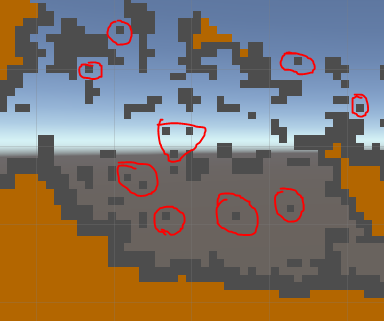
You did not notice that in this kind of cave does not look the best way? Too many extra details
(you may think otherwise) .
To get rid of some
# 4d4d4d blotches, we will write this method in
ground_libray :
Cleaner public static void clear_caves(ref block[,] b) { for (int x = 0; x < b.GetLength(0); x++) for (int y = 0; y < b.GetLength(1); y++) { if (b[x, y] == null) continue; if (solo(b, 2, 13, new int[2] { x, y })) b[x, y] = null; } }
But it will be difficult to understand what is happening here if you don’t know what the
solo function does:
static bool solo (block[,] b, int rad, int min, int[] start) { int cnt = 0; for (int x = (start[0] - rad); x <= (start[0] + rad); x++) { if (x < 0 || x >= b.GetLength(0)) continue; for (int y = (start[1] - rad); y <= (start[1] + rad); y++) { if (y < 0 || y >= b.GetLength(1)) continue; if (b[x, y] == null) cnt += 1; else continue; if (cnt >= min) return true; } } return false; }
In the parameters of this function must be our
field , the
radius of the check point , the
"destruction threshold" and the
coordinates of the point being checked .
Here is a detailed explanation of what this function does:
int cnt - the current “threshold” counter
Then there are two cycles that check all points around the one whose coordinates are transferred to start . If there is an empty dot , then we add a unit to cnt , upon reaching the "threshold of destruction" we return the truth - the dot is superfluous . Otherwise we do not touch it.
I set the kill threshold at 13 empty points, and check radius 2 (that is, it will check 24 points, not including the central one)
ExampleThis one will remain unscathed, as there are only
9 empty points.

But this is not lucky - around as many as
14 empty points

A brief description of the algorithm:
we go through the whole field and check all the points on whether they are needed or not. Then we simply add this line to our
ground_generator :
ground_libray.clear_caves(ref ground);
As we can see - most of the unnecessary particles just gone.Add some paint
Our mountain looks very monotonous, I find it boring.
Let's add some paint. Add the
level_paint method to the
ground_libray :
Mountain painting public static void level_paint(ref block[,] b, Color[] all_c) { for (int x = 0; x < b.GetLength(0); x++) { int lvl_div = -1; int counter = 0; int lvl_now = 0; for (int y = b.GetLength(1) - 1; y > 0; y--) { if (b[x, y] != null && lvl_div == -1) lvl_div = y / all_c.Length; else if (b[x, y] == null) continue; b[x, y] = new block(all_c[lvl_now]); lvl_now += counter >= lvl_div ? 1 : 0; lvl_now = (lvl_now >= all_c.Length) ? (all_c.Length - 1) : lvl_now; counter = counter >= lvl_div ? 0 : (counter += 1); } } } </ <cut />source> . , , . , . <b>Y </b> , . </spoiler> <b>ground_generator </b> : <source lang="cs"> ground_libray.level_paint(ref ground, new Color[3] { new Color(0.2f, 0.8f, 0), new Color(0.6f, 0.2f, 0.05f), new Color(0.2f, 0.2f, 0.2f), });
I chose only 3 colors:
Green ,
dark red and
dark gray .
You can, of course, change both the number of colors and the meanings of each. I did this:
But still it looks too strict to add a bit of randomness to the colors, we will write this property in
ground_libray :
Random colors public static float color_randomize = 0.1f; static float crnd { get { return Random.Range(1.0f - color_randomize, 1.0f + color_randomize); } }
And now in the
level_paint and
make_thick methods , in the lines where we assign colors, for example in
make_thick :
b[x, y] = new block(o);
We will write this:
b[x, y] = new block(o * crnd);
And in
level_paint b[x, y] = new block(all_c[lvl_now] * crnd);
As a result, you should have everything look like this:
disadvantages
Suppose that we have a field of 1024 by 1024, we need to generate 24 caves, the thickness of the edge of which will be 4, and the size will be 80,000.
1024 * 1024 + 24 * 64 * 80000 =
5,368,832,000,000 operations.
This method is only suitable for generating small modules for the game world; it is
impossible to generate something very large
at a time .